AI Virtual Summit Production System
This is an example UI built to illustrate the idea, not the actual product. Design can be customized to whatever look and workflow fits the task at hand.
How BigMoves AI Automated an Entire Virtual Summit Pipeline and Cut 50 to 100 Hours of Manual Work Every Week
Virtual Summits | AI Content Production | n8n + Airtable + OpenAI + Fal.ai + GoHighLevel + WordPress + Google Drive


The Situation
BigMoves AI runs virtual summits across multiple brands… BigMoves AI, New Paradigm Intimacy, and New Paradigm Parenting. Each summit means dozens of expert speakers, hours of recorded interviews, and a mountain of content that has to come out of every session.
Titles, descriptions, thumbnails, social posts, reels, email campaigns, cheat sheets, infographics, and full website pages. Then all of it has to go live across YouTube, Instagram, WordPress, and a CRM.
Producing that by hand for a single summit is a full time job for a small team. Doing it over and over, across brands, on a hard launch deadline, was not sustainable.
The Problem
Every session produced the same long checklist of manual work. Someone had to watch or read the interview, write the copy, design the graphics, cut the clips, build the emails, load everything into WordPress and the CRM, then schedule the social posts.
Every speaker needed a rewritten bio, a cleaned up headshot, their social profiles found, and a personalised outreach email drafted.
None of it lived in one place. There was no single view of which sessions were done, which assets already existed, what the AI spend was, or what still needed a human.
Work sat in people’s heads and across scattered tools. The week before a launch turned into a scramble.
The Solution
We built one Airtable command centre wired to roughly 40 n8n workflows. Every stage of a summit… research, speaker sourcing, content production, creative generation, copywriting, and multi platform publishing… runs from a button in Airtable. Nobody on the team opens n8n.
The whole system shares two habits. Every workflow writes a live status back to Airtable (In Progress, AI Writing, Done, Error) so anyone can see where a task stands at a glance. And every AI call logs its token count and dollar cost to a central AI Usage Tracker, so spend stays visible per task and per brand.
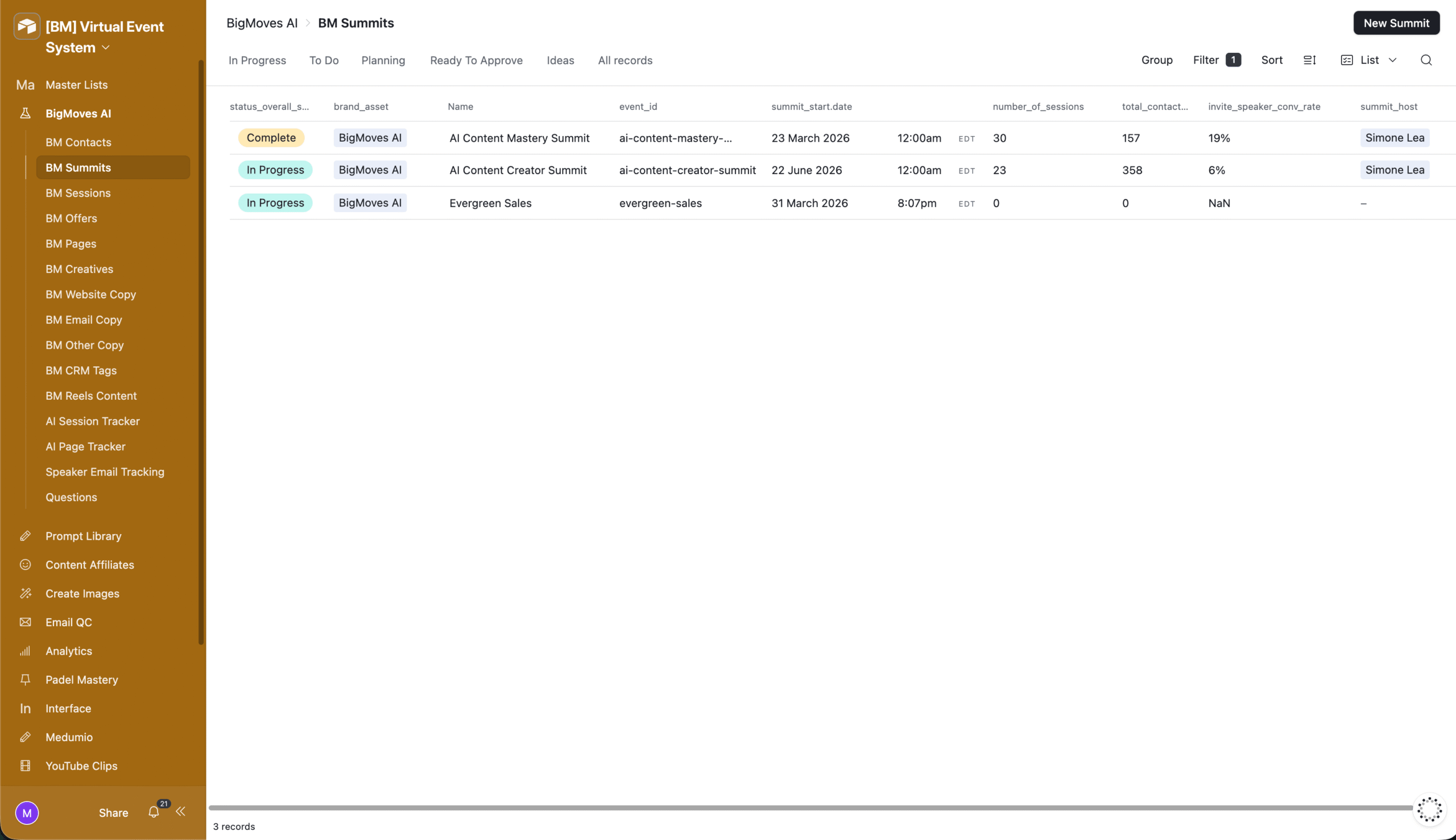
Here is how the pipeline flows across the life of a summit.
Phase 1: Summit Setup and Research
The system stands up the foundation for a new summit before any content exists.
- Create Google Drive Folder For Summit Launch: spins up a standard folder tree (Speakers, Resources, Others) for each new summit and writes the folder IDs and links back to Airtable.
- Analyze Image and Create Brand Palette: reads a screenshot of the summit page and returns a full brand colour palette (primary, secondary, accent, and neutral hex codes) that every downstream design task then uses.
- Complete Research with Added Prompts: runs a library of research prompts against the summit brief and saves structured research results back into Airtable.
- Create CRM Tags: reads a tag list from Airtable, checks GoHighLevel for tags that already exist, and creates only the missing ones so the CRM stays clean.
Phase 2: Speaker Sourcing and Prep
Once the summit exists, the system finds speakers and gets them ready.
- Find Summit Speakers: scans Instagram, YouTube, TikTok, LinkedIn, Facebook, and the open web for candidates that match the summit brief, dedupes them against existing contacts, enriches the strong ones, scores them, and drafts a personalised invite for anyone above the quality threshold.
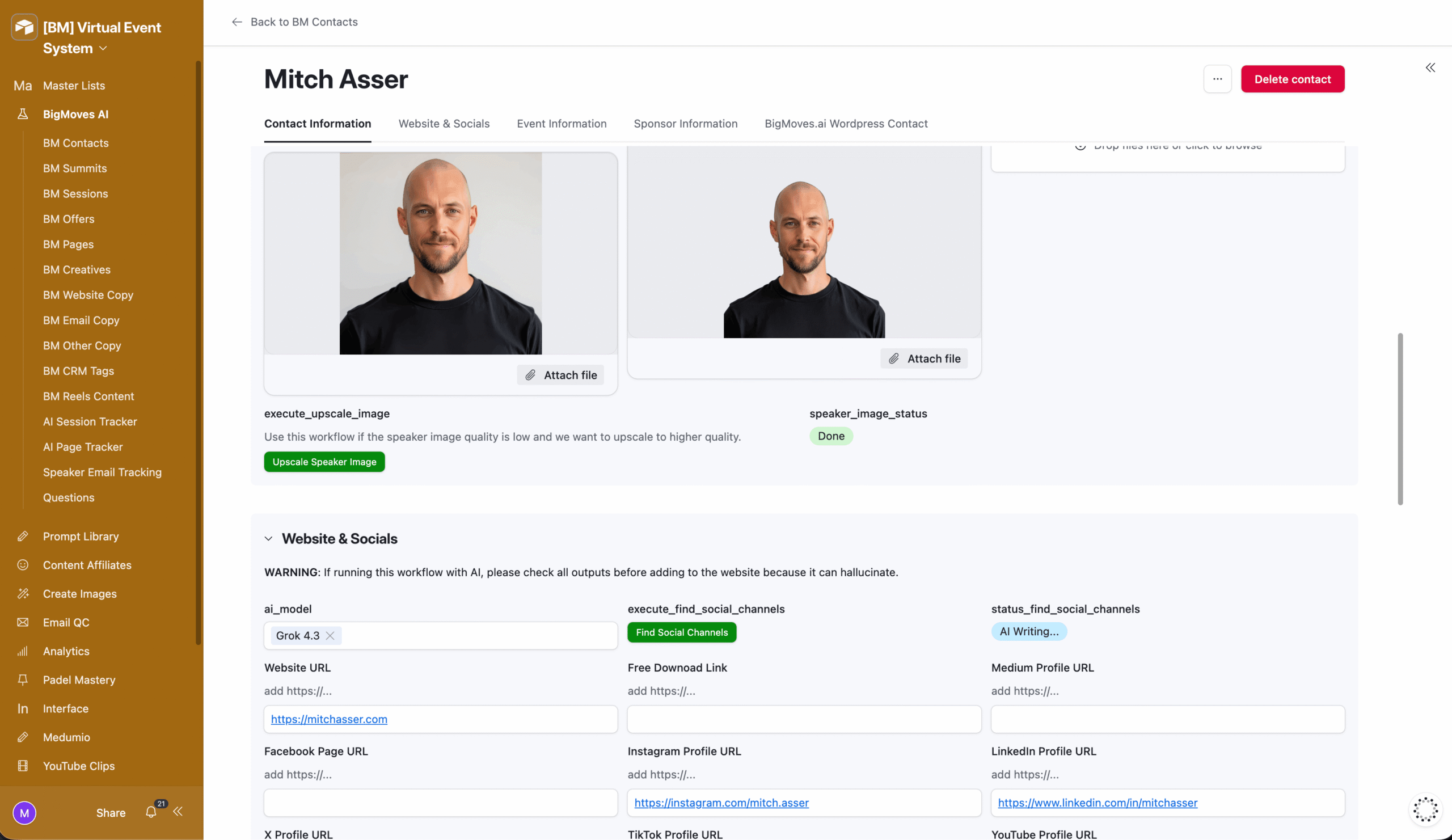
- Social Media Profile Research: finds a contact’s profiles across the major platforms and cleans the URLs before saving them to the record.
- Rewrite Speaker Bio: rewrites each bio into a clean, readable, on brand two paragraph format.
- Upscale Contact Headshot: runs headshots through a 2x face aware upscaler for print quality profile images.
- Speaker Headshot Background Removal: cuts the background out of each headshot for use on graphics and site pages.
- Write Speaker Emails: drafts personalised outreach and coordination emails from the speaker and session context.
- Create New Contact In WordPress: syncs each speaker profile, bio, links, and headshot to the correct brand website, creating or updating the entry as needed.
Phase 3: Session Ingestion and Content Production
This is where a raw interview turns into a full content set.
- Download YouTube Transcript: pulls and formats the transcript for each recorded session.
- Transcript Ingestion and Knowledge Tagging: cleans transcripts, splits them into chunks, and tags each chunk with AI so the content becomes searchable knowledge, routed into the right schema per brand.
- Create Video Introduction: writes a 30 to 45 second host intro script plus 15 interview questions for each session.
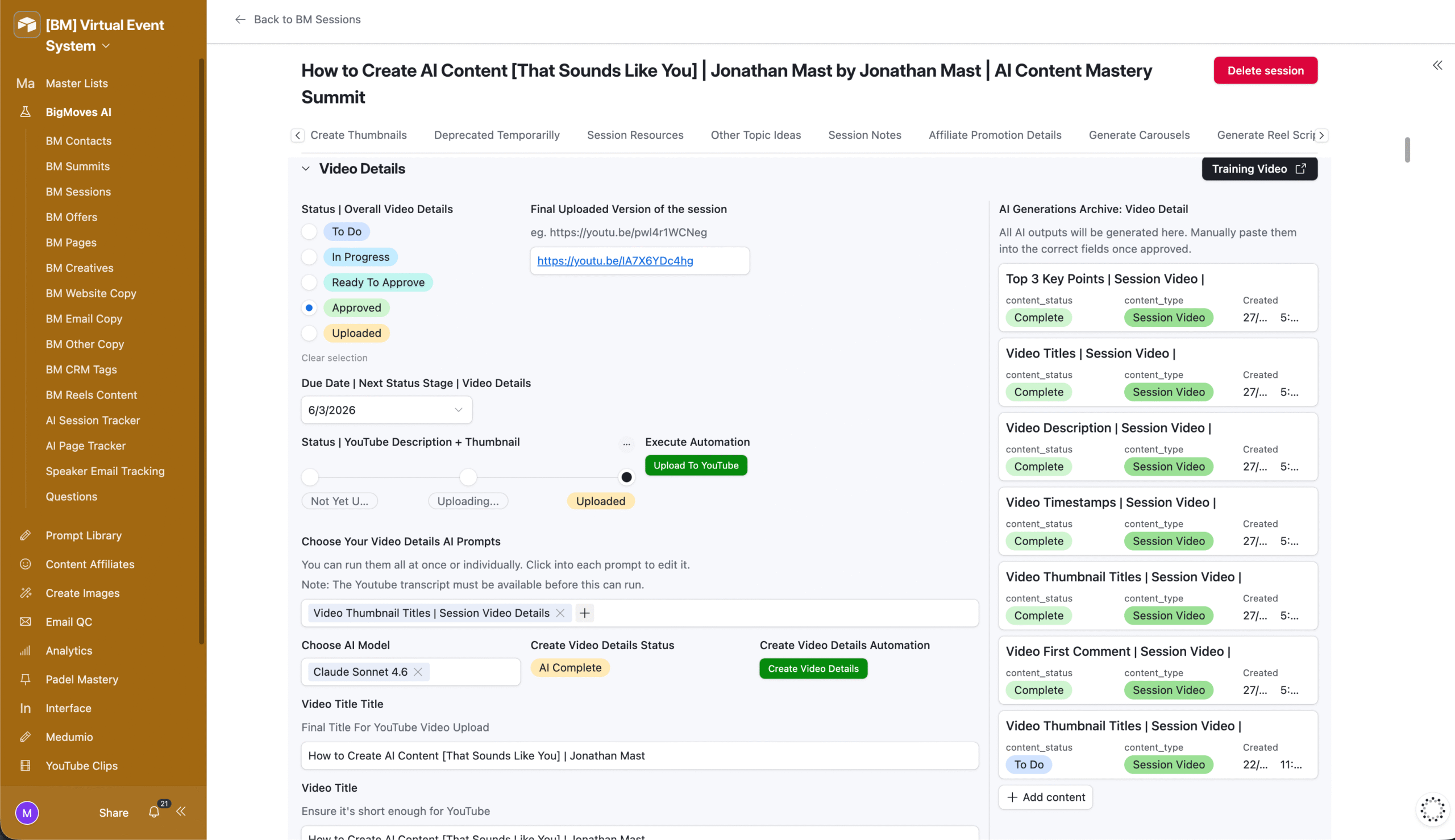
- Create Session Titles, Descriptions and Details: turns the raw transcript into finished titles, descriptions, and video copy.
- New Topic Ideas: generates 10 complementary topic ideas from each session transcript.
- Find Resources From Transcript and Enrich: extracts every tool, site, and discount mentioned in a session, verifies each one with web search, and creates resource records.
- Create Session Notes: builds a branded, PDF ready cheat sheet from the transcript and saves it to Google Drive with sharing set.
- Create YouTube Clips: reads the full transcript and produces a package of clip titles, descriptions, and thumbnail briefs ready for review.
- Sync AI Tools With Resources: qualifies mentioned tools, matches them to affiliate deals via the BigMoves API, and keeps the tools database, WordPress affiliate links, and ClickUp signup tasks in sync.
Phase 4: Creative and Visual Assets
With copy generated, the system produces the visuals.
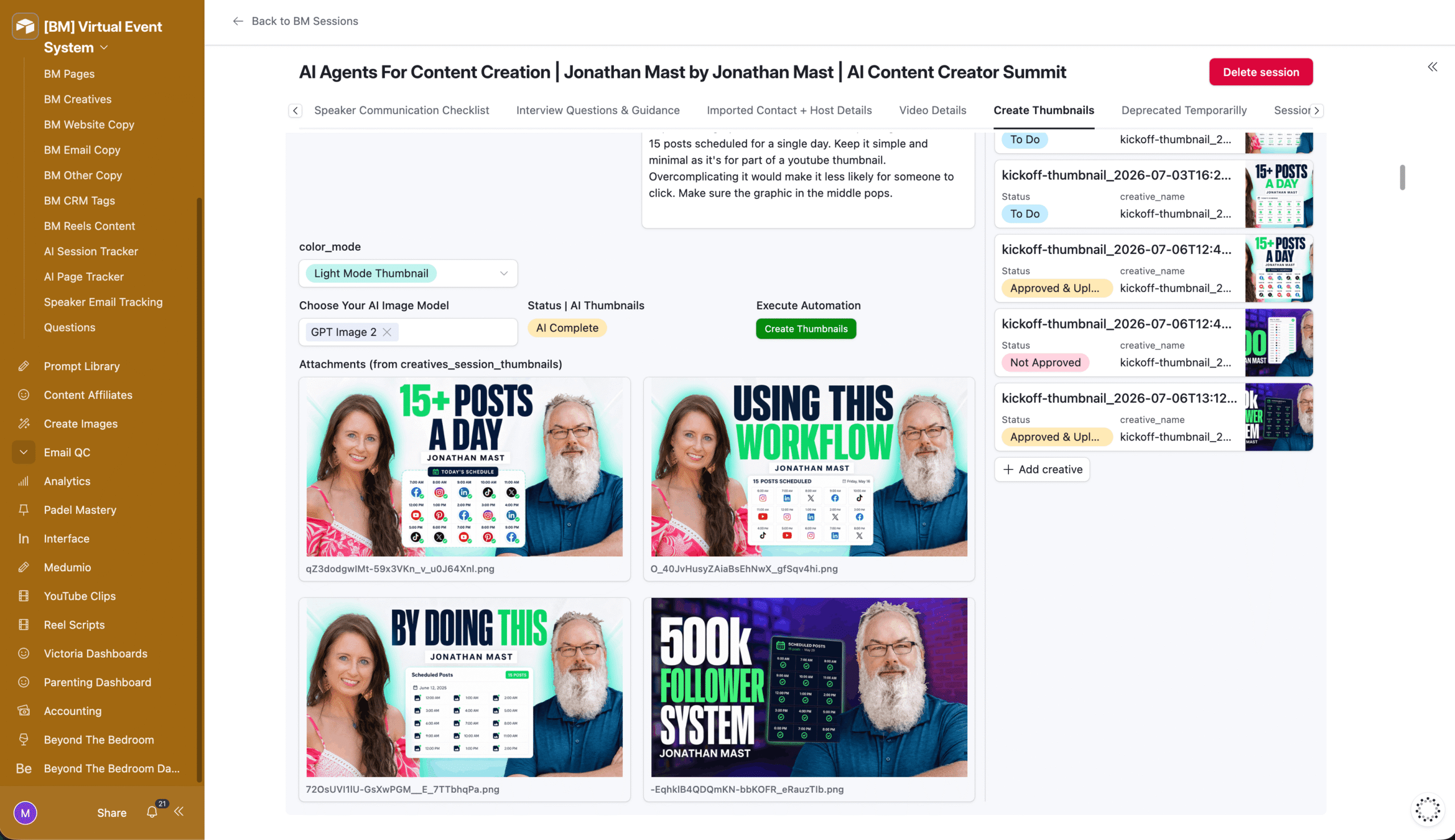
- Create Thumbnails and Create YouTube Thumbnails: generate branded session and clip thumbnails from speaker images, the brand palette, and a style reference.
- Create Session Main Infographic: turns a transcript into a full branded infographic.
- Create Social Media Graphics: produces graphics in three aspect ratios (9:16, 4:5, and 1:1) per session.
- Create Reels Content: builds Instagram carousel plans, hooks, captions, and branded title and CTA slides from a session.
- Create Reel Scripts: generates reel scripts and captions from transcripts against a prompt library.
- Update Title, CTA or Headshot: lets the team regenerate a single slide (title, CTA, or headshot) on demand without redoing the set.
- Edit Image: runs prompt based AI edits on any image in the base.
- Upload Session Infographic to Google Drive: archives finished infographics and writes the shareable link back to Airtable.
Phase 5: Copy and Campaign Creation
Alongside the visuals, the system writes the marketing.
- Create Social Media Posts: writes promo copy for each session from its transcript.
- Create Affiliate Email and Social Copy: produces affiliate promo emails and social posts for speakers to share.
- Create Emails: writes on brand summit promo emails plus five subject line and preview text variations for each.
- Create Summit Promo Email in GHL: builds a four email promo series straight into GoHighLevel.
- Create YouTube Email in GHL: drafts a high converting email off a video and loads it into GoHighLevel as a campaign.
- Generate Product Description: writes product copy for offers using brand context and resource data.
- Create GHL Product: creates the product and its pricing in GoHighLevel from an Airtable offer record.
Phase 6: Publishing and Distribution
The finished assets go live across every channel from Airtable.
- Post Carousels to GHL Instagram: uploads media and schedules carousels through the GoHighLevel Social Planner.
- Reels Series Schedule Post to GHL: uploads reels, generates an SEO title, and schedules them across platforms.
- Upload Session Details to bigmoves.ai: publishes full session pages, thumbnails, and resources to the right brand site, routed by brand.
- Upload to WordPress Hub: publishes session posts as drafts to the member hub with video embeds and resources attached.
- Upload YouTube Description and Title: pushes finished titles, descriptions, and tags to the correct brand YouTube channel.
- Upload eBook to Google Drive: archives generated eBooks and links them back to Airtable.
The Results
What used to be a manual grind of writing, designing, editing, and posting now runs from Airtable buttons. Across a summit build, that saved the team 50 to 100 hours a week in the run up to launch.
Every session produces its full content set… intro script, questions, titles, descriptions, clips, notes, infographics, social graphics, carousels, reels, and email campaigns… without a person writing copy or designing from a blank canvas.
Speakers are sourced, enriched, rewritten, and synced to the site automatically. Publishing to YouTube, Instagram, WordPress, and the CRM happens from the same base the content was produced in.
Two things stay visible the whole time. Status fields show exactly where every session and asset sits, so nobody has to ask. And the AI Usage Tracker logs the cost of every generation, so spend is known per task and per brand instead of being a mystery at the end of the month.
How It Worked
Before: producing a session meant a person reading the transcript, writing every piece of copy by hand, designing thumbnails and graphics in editing tools, cutting clips, building emails, loading it all into WordPress and GoHighLevel, then scheduling social posts.
Every speaker meant manual bio edits, headshot cleanup, profile hunting, and outreach writing. Nothing was tracked in one place, and the launch week was a scramble.
After: the whole path from raw interview to published, multi platform content runs through Airtable and n8n, with a human stepping in only to review and approve.
- Session ingested. The transcript is downloaded, cleaned, chunked, and tagged automatically.
- Content generated. One trigger per task produces the intro, questions, titles, descriptions, topic ideas, resources, notes, and clip packages.
- Creatives produced. Thumbnails, infographics, social graphics, carousels, and reel scripts are generated from the brand palette and speaker assets.
- Campaigns written. Summit emails, promo series, affiliate copy, and product listings are drafted and loaded into GoHighLevel.
- Everything published. Session pages go to WordPress, videos to YouTube, and posts to Instagram and the Social Planner, all from the same base.
- Costs and status tracked. Every step writes its status and its AI cost back to Airtable, so the team always knows what is done and what it cost.
Want a System Like This?
If you run virtual summits, courses, or any content heavy launch and you are still producing everything by hand, this is the kind of infrastructure we build.
End to end AI content pipelines, speaker sourcing and enrichment, multi platform publishing, and cost tracking, all managed from one Airtable command centre. Built once, run every launch.