AI Sales and Support Agent
This is an example UI built to illustrate the idea, not the actual product. Design can be customized to whatever look and workflow fits the task at hand.
How an Over-Water Home Developer Unified Voice, WhatsApp, SMS, and Web Chat Into One AI Sales and Support Agent
Real Estate | AI Voice & Messaging Agent | n8n + ElevenLabs + Airtable + Pipedrive + Twilio + Cal.com + Stripe
The Situation
A developer of engineered over-water residential communities sells high-value homes and waterfront estate units to buyers, investors, and media contacts spread across time zones. Prospects reach the sales team however is convenient in the moment: an inbound phone call, the live chat widget on a property page, a WhatsApp message, or a text. Every conversation needs to identify who is reaching out, understand what they are looking for, check what is actually available to sell them, deliver the right brochure or investor pack, and move them toward a booked call or a deposit, without making them repeat themselves if they switch channels partway through.
The Problem
There was no single conversational layer spanning all four channels. A prospect who called about a two-bedroom unit and later messaged on WhatsApp had to start over, because nothing connected the two conversations. There was no live inventory feed to check availability against, no structured record of which brochures, investor packs, or media kits had already been sent, and no consistent way to capture a lead’s details into the sales pipeline. Deposit-ready buyers had no faster lane to a human than a casual browser asking general questions, and nothing captured what actually happened on real conversations and fed it back into the assistant handling them, so knowledge gaps and weak answers just repeated themselves call after call.
The Solution
We built a single AI sales and support agent, covering voice, WhatsApp, SMS, and the web chat widget, backed by a 17-workflow n8n system connected to Airtable, a custom CRM API, Pipedrive, Twilio, Cal.com, and Stripe. The agent recognizes returning contacts across every channel by phone number or email, checks live unit availability, sends the correct brochure, investor pack, media kit, or deposit link, books meetings, and silently alerts the sales team the moment a lead shows real buying intent. Every interaction is logged into two CRMs kept in sync with each other, and a dedicated pipeline mines completed conversations for new questions and gaps, folding the answers back into the agent’s knowledge base so the system keeps improving on what it already handles.
The 16 n8n workflows:
- Inbound WhatsApp Message: the real-time bridge between the WhatsApp number and the AI agent. Twilio delivers the inbound message, the workflow looks up the sender’s CRM record by phone number, resolves their identity, pulls prior conversation history, and calls the agent through a bridge worker. The reply is extracted, saved back into shared history, and sent to the contact over WhatsApp, while a parallel branch checks whether the CRM’s phone field needs updating and a webhook mirrors the exchange into the CRM’s message log.
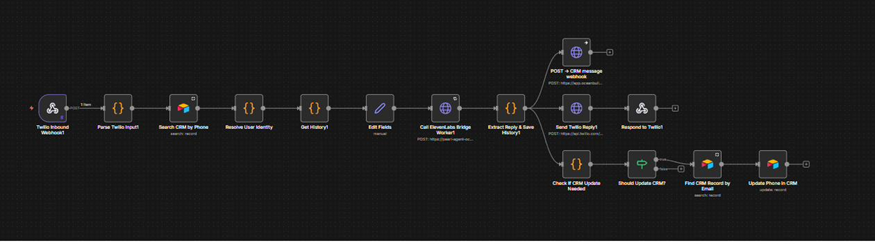
- Twilio Inbound Webhook → Parse Twilio Input → Search CRM by Phone → Resolve User Identity → Get History → Edit Fields → Call ElevenLabs Bridge Worker → Extract Reply & Save History → Send Twilio Reply → Respond to Twilio, with parallel branches to POST → CRM message webhook and Check If CRM Update Needed → Should Update CRM? → Find CRM Record by Email → Update Phone in CRM
- Inbound SMS: mirrors the WhatsApp workflow’s identity-resolution and history-lookup structure for standard text messages, using a dedicated SMS-prefixed conversation-history key so a contact’s SMS thread and WhatsApp thread never cross-contaminate context. Twilio delivers the inbound text, the CRM is checked by phone number, history is retrieved, the agent generates a reply through the same bridge worker, and the reply goes back over SMS while the CRM stays in sync.
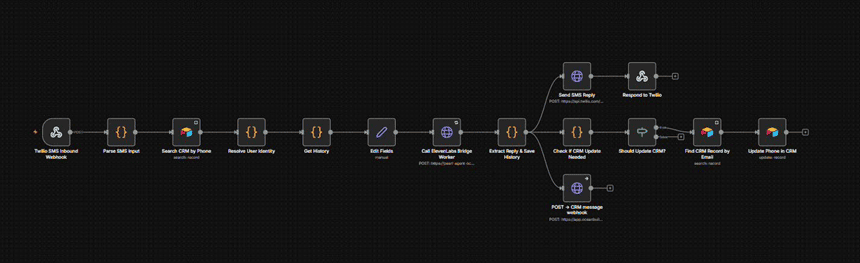
- Twilio SMS Inbound Webhook → Parse SMS Input → Search CRM by Phone → Resolve User Identity → Get History → Edit Fields → Call ElevenLabs Bridge Worker → Extract Reply & Save History → Send SMS Reply → Respond to Twilio, with parallel branches to POST → CRM message webhook and Check If CRM Update Needed → Should Update CRM? → Find CRM Record by Email → Update Phone in CRM
- Outbound Call: triggered by a button click on the lead’s Airtable record. Fetches the lead’s data and latest call log, generates outbound call context (the objective the agent should open the call with), triggers the call through the agent platform, processes the resulting call outcome, and updates the CRM record and call status.

- Airtable Button Webhook → Webhook Response → Parse Lead Data → Fetch Latest Call Log → Generate Outbound Context → Update Call Status → Trigger Call via ElevenLabs → Process Call Response → Update CRM Record
- Outbound WhatsApp Message: the WhatsApp equivalent of the outbound call workflow, also triggered from an Airtable button. Pulls the lead’s data and call history, generates a personalized WhatsApp context and greeting, sends it through Twilio, processes the response, and updates the CRM record and WhatsApp status.

- Airtable Button Webhook → Webhook Response → Parse Lead Data → Update Whatsapp Status → Fetch Latest Call Log → Generate WhatsApp Context → Generate Greeting (AI) → Send WhatsApp via Twilio → Process Response → Update CRM Record
- Fetch CRM Profile: a lightweight lookup the agent calls at the start of a conversation for warm-start personalization, returning a brief history snapshot for a known contact.
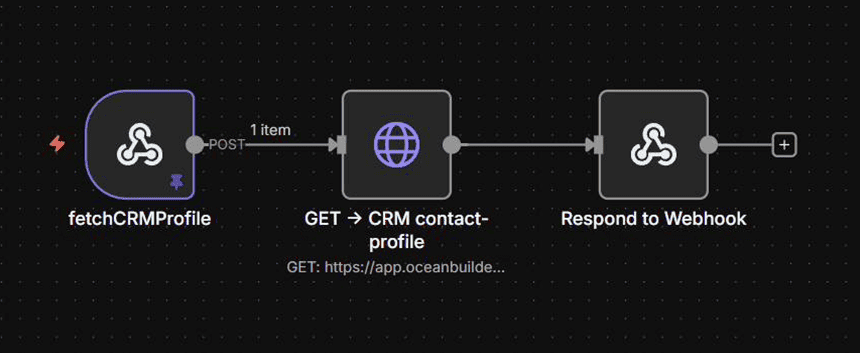
- fetchCRMProfile → GET → CRM contact-profile → Respond to Webhook
- Check Inventory: checks live availability of units against the caller’s stated preferences, with no identity required, so anyone can ask what’s available before ever sharing contact details.
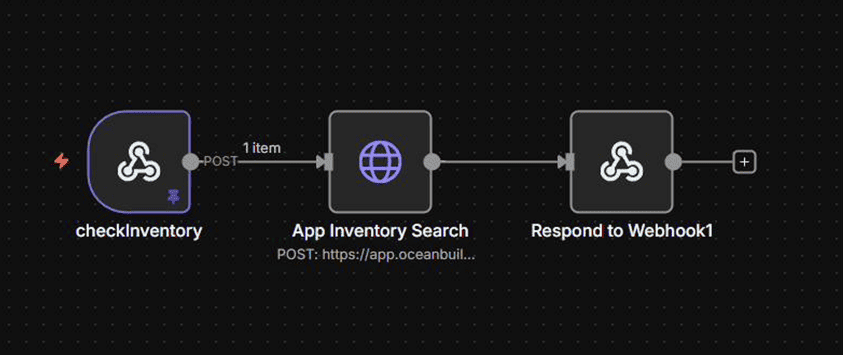
- checkInventory → App Inventory Search → Respond to Webhook
- sendResources: the resource-delivery engine behind brochures, investor packs, media kits, and deposit payment links, across both email and WhatsApp. After validating the email address and detecting the channel, email requests route by persona (Buyer, Investor, Media, or Deposit) to the matching brand asset search and a personalized, pre-formatted email; WhatsApp requests look up the contact’s phone number from the CRM, gather the matching downloads by persona, assemble a single message, and send it only if permitted.
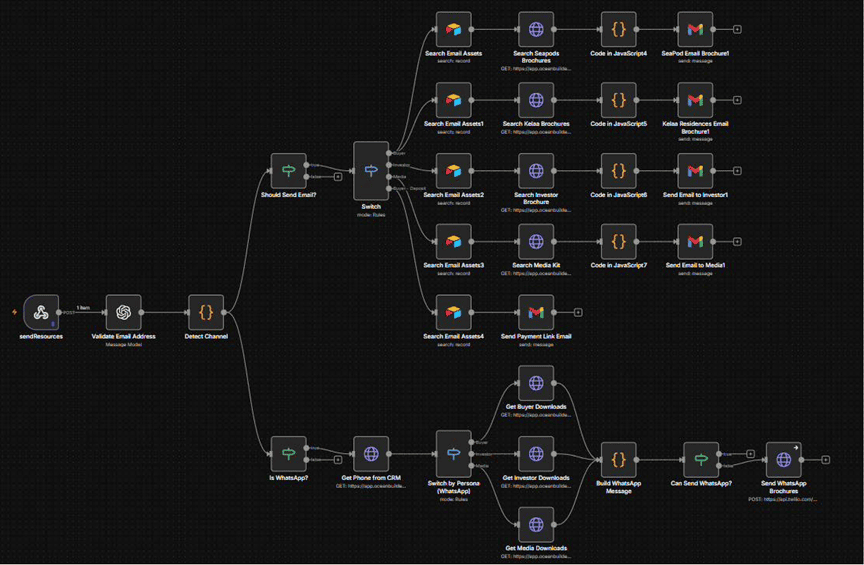
- sendResources → Validate Email Address → Detect Channel, then splits: (email) Should Send Email? → Switch by persona → Search Email Assets → Search matching brochures → format (code) → send branded email; (WhatsApp) Is WhatsApp? → Get Phone from CRM → Switch by Persona (WhatsApp) → Get Buyer/Investor/Media Downloads → Build WhatsApp Message → Can Send WhatsApp? → Send WhatsApp Brochures
- Send Booking Link: validates the email address, retrieves the correct calendar asset, and emails the scheduling link once a caller agrees to a meeting but doesn’t book on the spot.
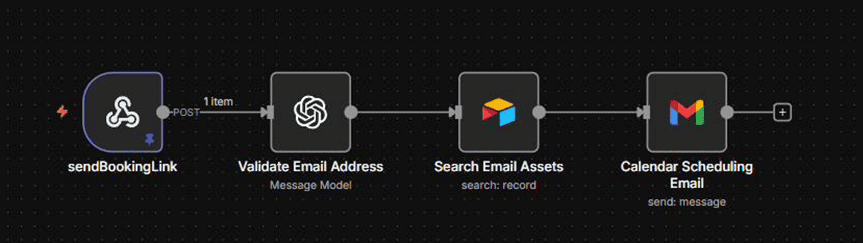
- sendBookingLink → Validate Email Address → Search Email Assets → Calendar Scheduling Email
- recordCRMLead: the lead-recording tool called once identity is confirmed and again at the end of every conversation. Validates the email, upserts the contact into the custom CRM, then searches for a matching Pipedrive person and deal, creating or updating each so the two systems never fall out of step with each other.
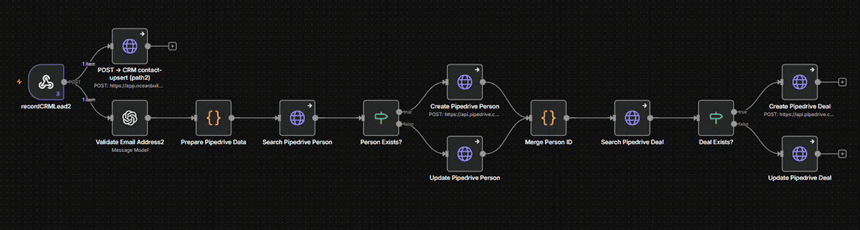
- recordCRMLead → Validate Email Address → POST → CRM contact-upsert, and in parallel: Prepare Pipedrive Data → Search Pipedrive Person → Person Exists? → Create/Update Pipedrive Person → Merge Person ID → Search Pipedrive Deal → Deal Exists? → Create/Update Pipedrive Deal
- Record Call Log: logs every call into both CRMs, splitting on whether a transcript is available. With a transcript, it’s converted to a file and uploaded to Google Drive before the CRM interaction and the matching Pipedrive deal are updated; without one, the same Pipedrive and CRM update happens on a lighter branch.

- recordCallLog → POST → CRM contact-upsert → If transcript available: Edit Fields → Convert to File → Upload file (Google Drive) → POST → CRM interaction-create (with transcript) → Prepare Pipedrive Data → Search Pipedrive Person → Extract Person ID → Get Person Deal → Update Pipedrive Deal (with transcript); otherwise the equivalent sequence runs without the transcript steps
- Sales Call Booked: triggered when a calendar booking is created or cancelled. A switch node routes on the booking event, checks whether the booking already exists to avoid duplicate records, creates or updates the booked-call record, and mirrors the result back to the custom CRM.
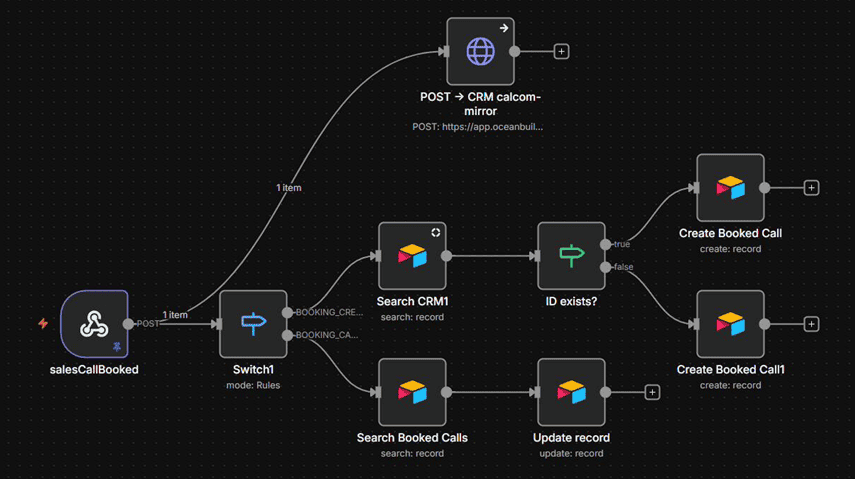
- salesCallBooked → Switch (booking created / cancelled) → POST → CRM calcom-mirror, and → Search CRM / Search Booked Calls → ID exists? → Create Booked Call or Update record
- Post Call Handler: the analysis engine that runs after every conversation. It pulls new questions raised during the call, has an analysis model judge whether each was answered and how well, and fills in any missing call insights. A second branch checks whether any question should be escalated as a new FAQ or a support issue, emailing the sales team when it should, while the interaction and an updated lead score are posted back to the CRM.

- postCallHandler → Search records → Aggregate new questions → Get New Questions → Agent Answer Analysis → If no unanswered question in the webhook → Fill Missing Call Insights, and in parallel → GET → CRM contact-profile → If → Search Issue Escalation → Aggregate new FAQs → Get New FAQs → Split Out → If → Search Email Assets → Sales Intelligence Analyst → Send Email to Sales Team; results posted via POST → CRM interaction-create and POST → CRM score-update
- Weekly Post-Call Analysis Report: runs on a schedule, pulls every call from the last seven days, builds an analysis prompt, and, if there were any calls, has a model produce a written performance summary that’s emailed out as the weekly report.
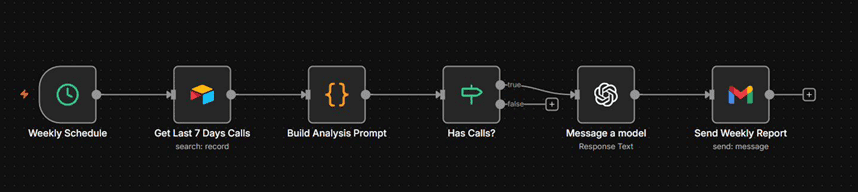
- Weekly Schedule → Get Last 7 Days Calls → Build Analysis Prompt → Has Calls? → Message a model → Send Weekly Report
- Update Agent Knowledge Base: the learning loop, and the most complex workflow in the system at 44 nodes. New content arrives three ways: a Google Drive trigger, or one of three inbox tables (Seller Questions, Master Knowledge Base, Website Redirects) submitted through webhooks. Each source is converted to a plain-text file, merged into the existing knowledge base document, uploaded to the agent’s knowledge base, and the outdated version deleted; the workflow then triggers and polls the retrieval index job until it confirms completion. The new FAQs and unanswered questions surfaced by the Post Call Handler ultimately flow back through here, so the conversations the agent handles become the material that makes it smarter.
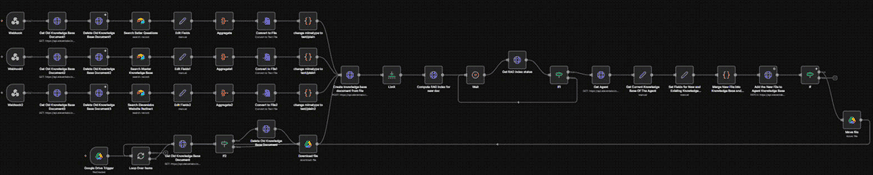
- Three inbox webhooks (Seller Questions, Master Knowledge Base, Website Redirect), each: Search source → Edit Fields → Aggregate → Convert to File → change mimetype to text/plain → Get/Delete Old Knowledge Base Document, merging into → Create knowledge base document from file → Compute RAG index for new doc → Get RAG index status (looped until ready) → Get Agent → Get Current Knowledge Base of the Agent → Merge New File into Knowledge Base → Add the New File to Agent Knowledge Base; a parallel Google Drive Trigger path replaces files the same way before a final Move File step
- Pipedrive ↔ Airtable Sync: two mirrored workflows keep Pipedrive and Airtable as equally authoritative views of the same pipeline. Pipedrive → Airtable listens for Pipedrive deal webhooks, fetches the related person, maps the fields, and updates the matching Airtable record only if one exists and has an email address, skipping and logging otherwise. Airtable → Pipedrive runs the reverse path: triggered by Airtable, it maps the record, finds the matching Pipedrive person and deal, and updates the deal, logging the sync result either way.
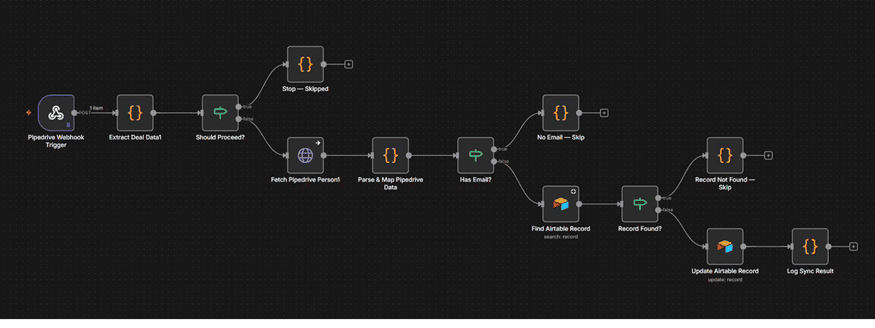
- Pipedrive Webhook Trigger → Extract Deal Data → Should Proceed? → Fetch Pipedrive Person → Parse & Map Pipedrive Data → Has Email? → Find Airtable Record → Record Found? → Update Airtable Record → Log Sync Result
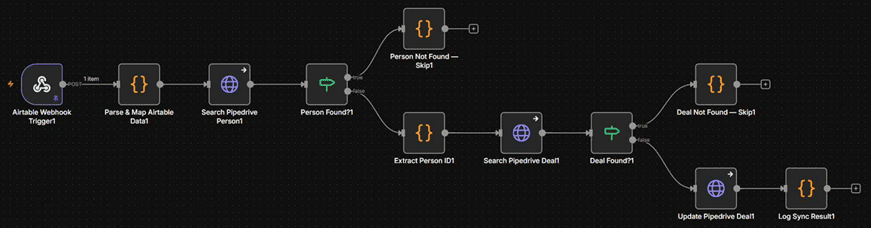
- Airtable Webhook Trigger → Parse & Map Airtable Data → Search Pipedrive Person → Person Found? → Extract Person ID → Search Pipedrive Deal → Deal Found? → Update Pipedrive Deal → Log Sync Result
- AI Support Agent Error Log: the safety net across all seventeen workflows. Any unhandled error trips the error trigger, a configuration step captures the failing workflow’s context, and a task is created in the team’s task manager so a human can investigate before it becomes a customer-facing gap.
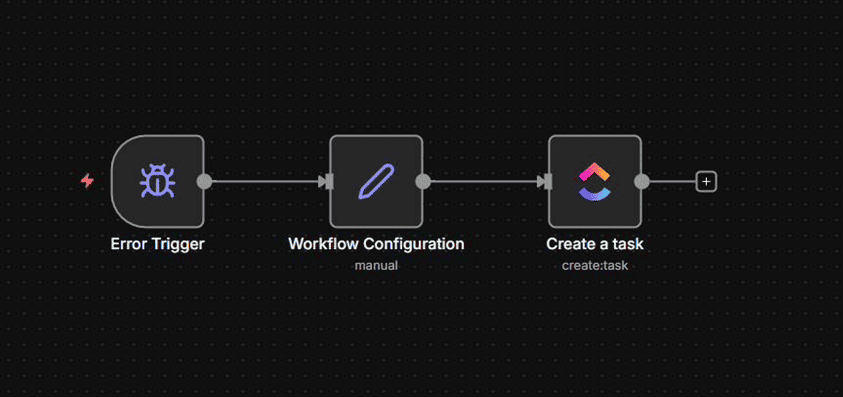
- Error Trigger → Workflow Configuration → Create a Task
The Conversational Agent
The n8n workflows above are the hands; the conversational agent is the brain that decides when to use them. Built on a voice and text AI platform, the agent is given a warm, professional persona, tuned separately for voice calls, the web widget, WhatsApp, and SMS, and follows a detailed set of conversation rules: identity is treated as an invitation rather than a gate, so a prospect can check availability or browse the site before ever giving a name or email; only one question is asked per turn; and a strict positive-framing rule keeps the agent from volunteering friction, restrictions, or objections the customer hasn’t asked about. Separate rule sets govern voice delivery (natural pacing, no stray performance cues in the transcript), WhatsApp behavior (single consolidated replies, no character-by-character spelling of names), and outbound calls (opening directly with the reason for the call instead of inbound-style greetings).
Eight tools are exposed to the agent, each mapped to one of the n8n workflows above: checking inventory, sending resources, sending a booking link, recording and fetching CRM data, recalling cross-channel memory, navigating the visitor to a page on the web widget, and silently alerting the sales team the moment a lead shows real buying intent. That last tool, together with a live transfer option, is deliberately gated: it fires only on confirmed buying intent, not on general curiosity or a request to speak to a human.
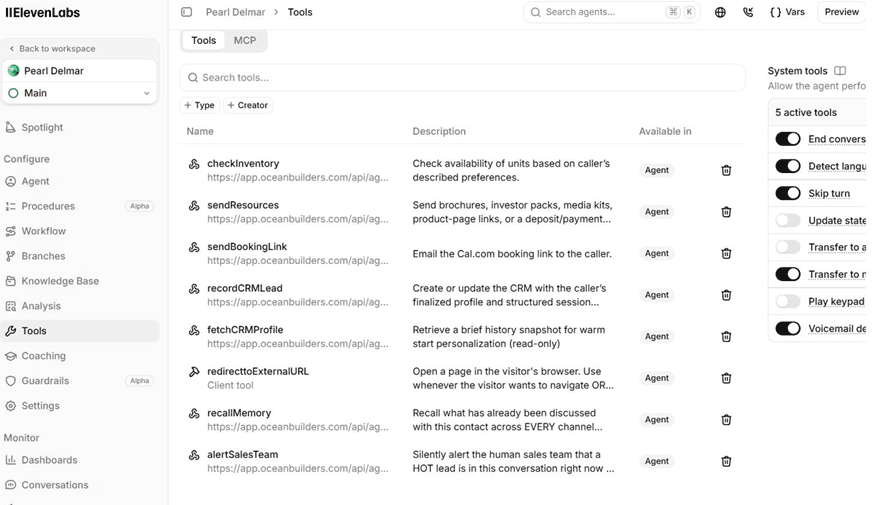
Agent Tools — eight tools available to the agent, each pointing at a workflow endpoint: checkInventory, sendResources, sendBookingLink, recordCRMLead, fetchCRMProfile, redirecttoExternalURL, recallMemory, and alertSalesTeam
The agent’s knowledge comes from three retrieval-indexed sources, kept current by the Update Agent Knowledge Base workflow: a navigation reference mapping site pages to their topics and URLs, a master knowledge base covering the product line and company details, and a running list of seller and qualification questions. Whenever the Post Call Handler workflow surfaces a new question or gap from a real conversation, the answer eventually lands in one of these three sources, and the retrieval index rebuilds so the next conversation benefits from it.
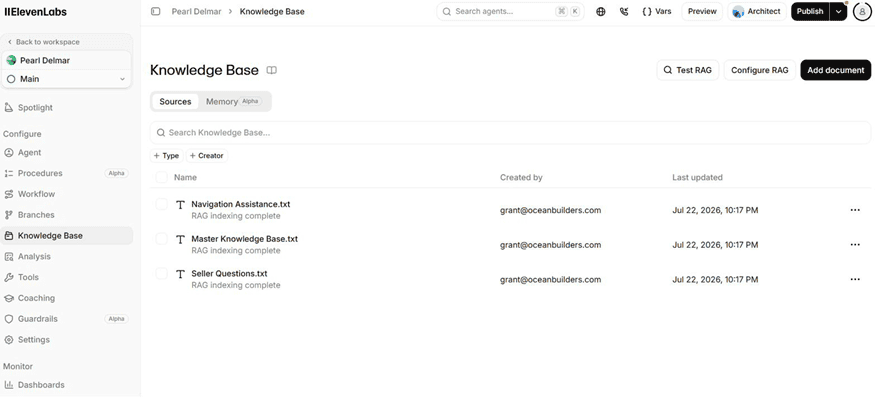
Knowledge Base — three retrieval-indexed sources feeding the agent: a navigation reference, a master knowledge base, and a seller questions file, all kept in sync by the knowledge base workflow
The Airtable Interface
The entire system is managed from a single Airtable base with four sections: Dashboards, Units, Sales Callback, and Inboxes.
Dashboards
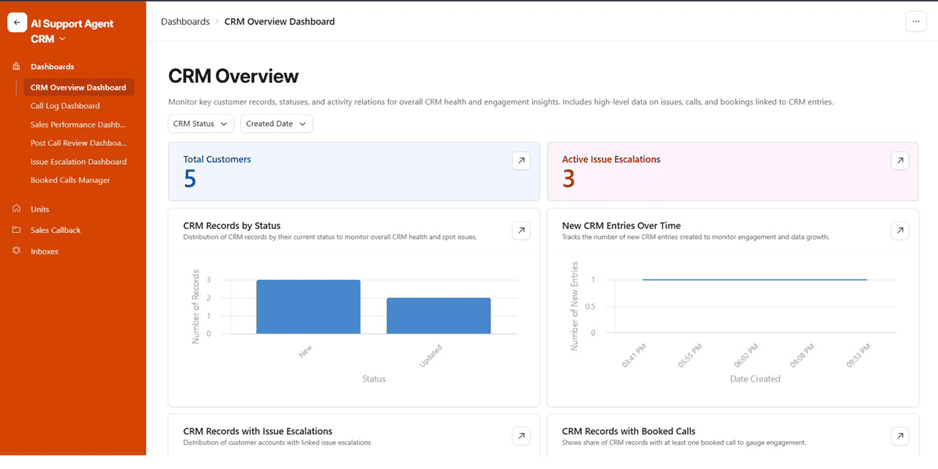
Five live dashboards give the team a real-time view of the pipeline without ever opening n8n.
CRM Overview Dashboard — total customers, active issue escalations, CRM records by status (New, Updated), and new CRM entries over time
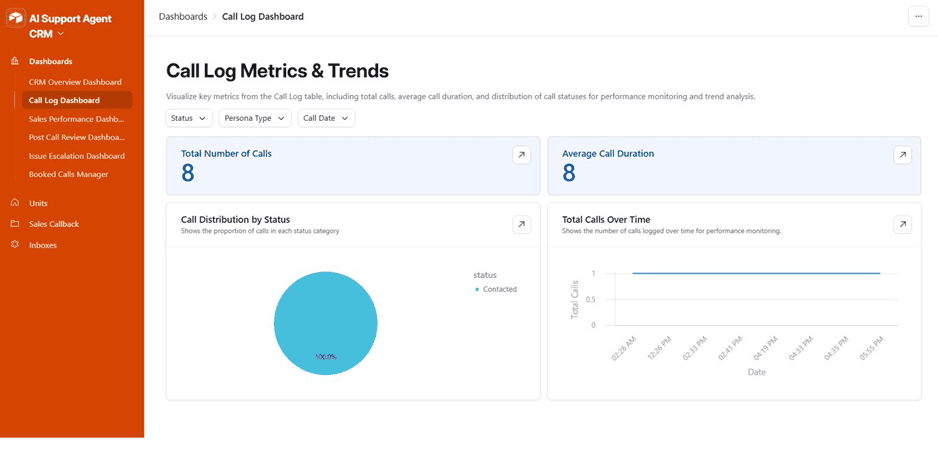
Call Log Dashboard — total number of calls, average call duration, call distribution by status, and total calls over time
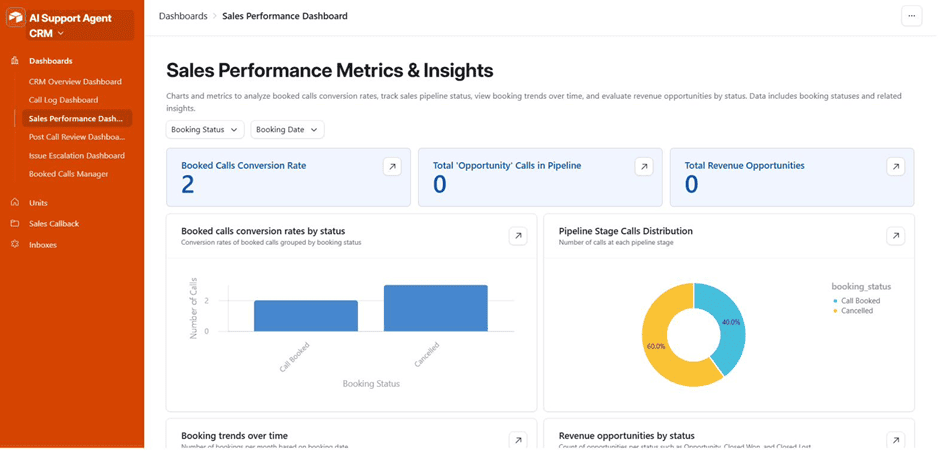
Sales Performance Dashboard — booked calls conversion rate, opportunity calls in pipeline, revenue opportunities, conversion rates by booking status, and pipeline stage distribution
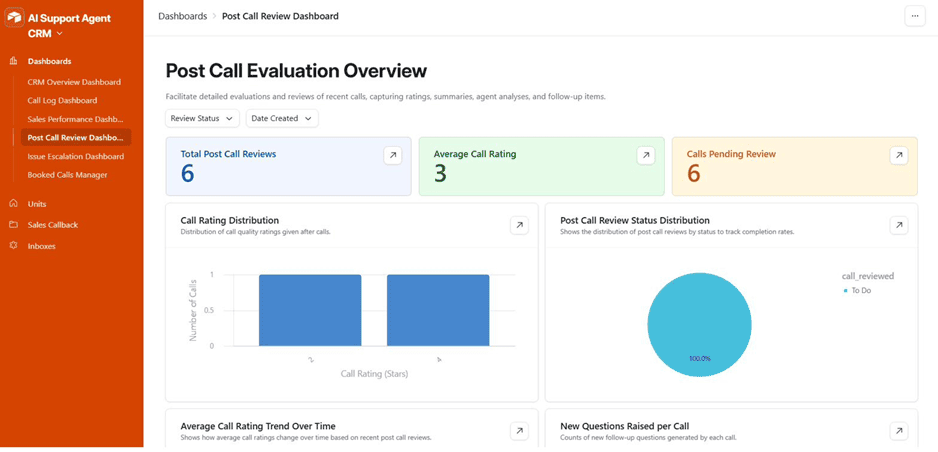
Post Call Review Dashboard — total post-call reviews, average call rating, calls pending review, call rating distribution, and review status distribution
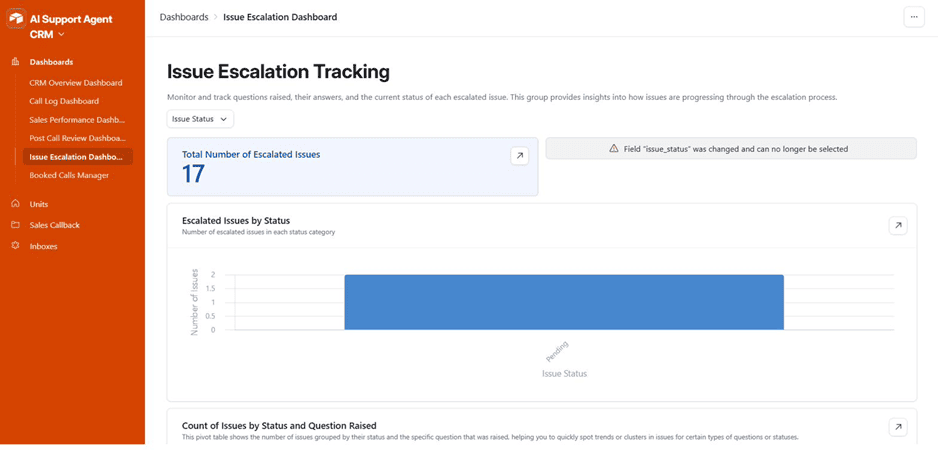
Issue Escalation Dashboard — total escalated issues, escalated issues by status, and a pivot of issue counts by status and question raised
Units
The Inventory table stores every sellable unit with its plot code, configuration, finishes, and pricing; the Downloads table stores every brochure and asset link, organized by persona, that sendResources can hand out.
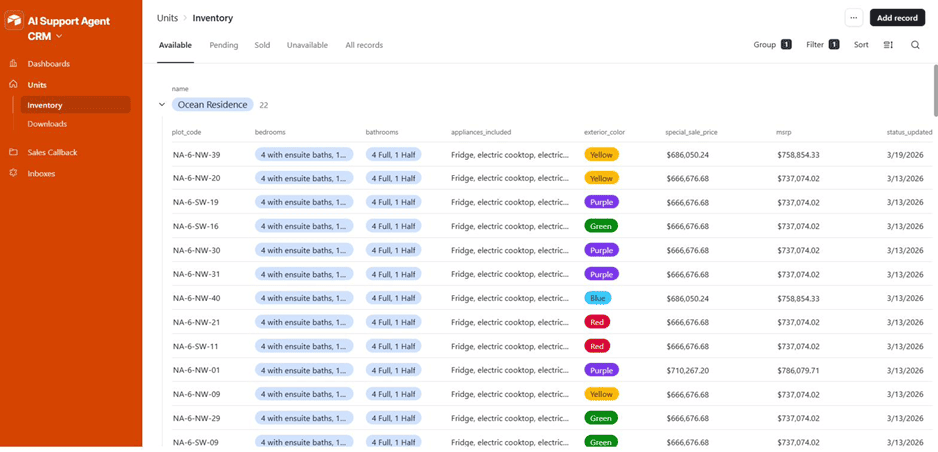
Inventory — available units grouped by development, with plot code, bedroom and bathroom configuration, included appliances, exterior finish, special sale price, MSRP, and last status update
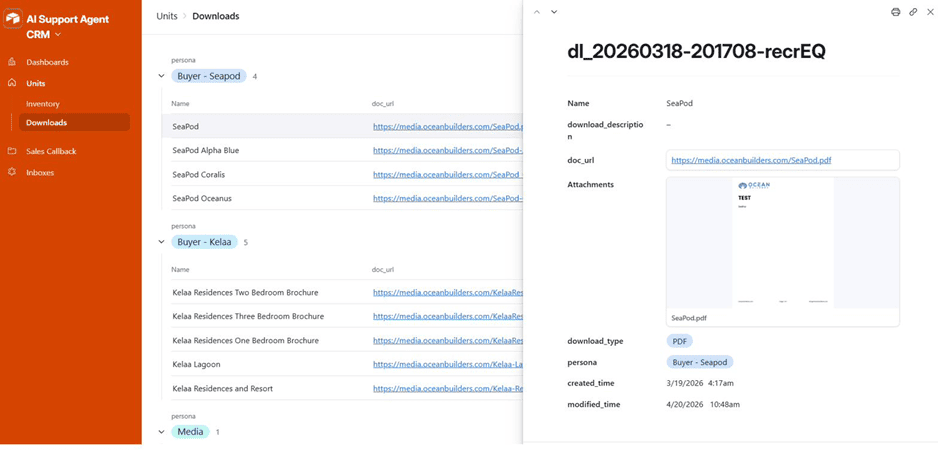
Downloads — brochure and asset links grouped by persona (Buyer, Investor, Media), each record showing name, document URL, download type, and linked persona
Sales Callback
Outbound Call and Message is where the sales team queues outreach: a button on each record triggers the Outbound Call or Outbound WhatsApp Message workflow. Post Call Review captures the AI’s own evaluation of each call, including a summary, a call rating, and an analysis of how well the agent answered what was asked.
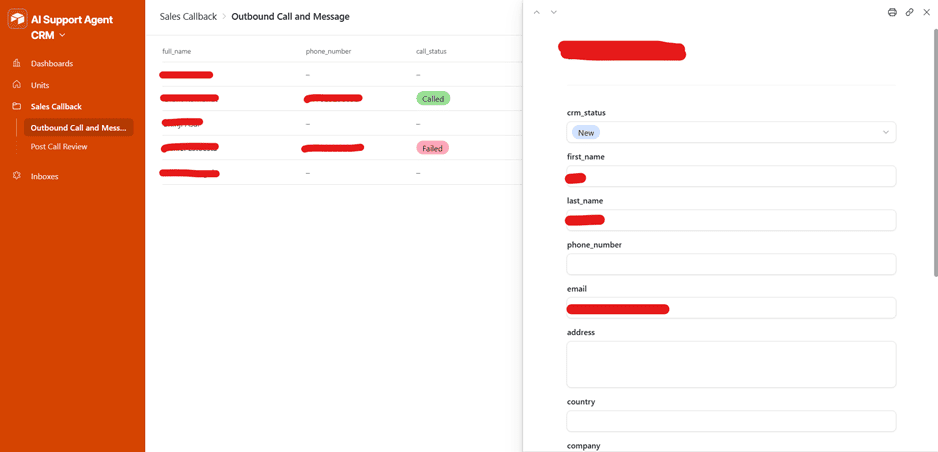
Outbound Call and Message — queued outbound contacts with call status (Called, Failed), linked to a detail record with CRM status, contact fields, address, and company
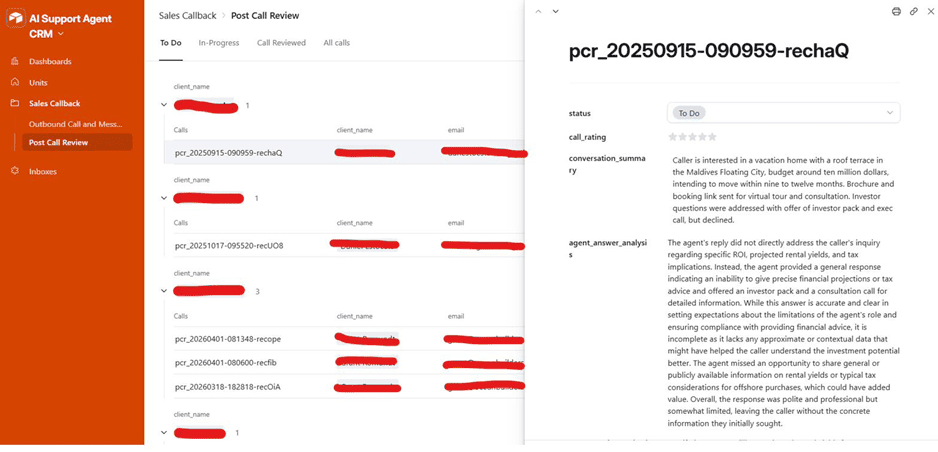
Post Call Review — calls grouped by contact and stage (To Do, In-Progress, Call Reviewed), with a detail panel showing status, call rating, an AI-generated conversation summary, and an agent-answer analysis
Inboxes
The Inboxes section is the raw intake layer feeding the Update Agent Knowledge Base workflow: an Issue Escalations Inbox, Master Knowledge Base Inbox, Call Log Review Inbox, CRM Record Review Inbox, Inventory Inbox, Seller Questions Inbox, and Elevenlabs Website Redirect Inbox. Each escalated issue tracks the question raised, its answer once resolved, and the call it originated from.
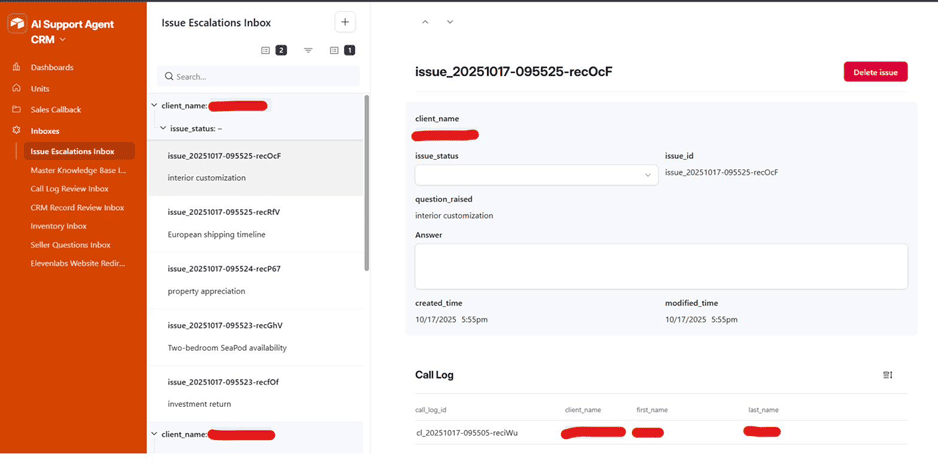
Issue Escalations Inbox — escalated issues grouped by contact, each with issue status, the question raised, an answer field, and a linked call log record
Results

This system was built and validated ahead of production rollout, so the figures above describe its scope rather than live call volume. Before it, a sales team fielding calls, WhatsApp messages, texts, and web chat had four disconnected front doors into the same pipeline, each with its own notion of who a contact was and what had already been sent to them. Now a single AI agent handles all four, backed by seventeen n8n workflows that carry a contact’s identity, history, and stage from first touch through to a booked call or a completed deposit.
The qualification path stays consistent regardless of which channel a prospect happens to use. Whether someone calls in, messages on WhatsApp, texts, or opens the website widget, the same identity resolution, inventory check, resource delivery, and CRM logging pipeline handles them, and a contact who switches channels mid-journey is recognized rather than asked to start over.
Hot leads are never left in a general queue. The moment a conversation shows real buying intent, the sales team is alerted silently in the background while the agent keeps the conversation moving, and a live transfer is offered when the moment genuinely calls for it.
The knowledge base compounds instead of staying static. Every completed call is reviewed for unanswered questions and analysis gaps; anything worth adding is routed into one of three knowledge sources, and the retrieval index rebuilds automatically, so the lessons of one conversation are available in the next.
How It Worked
Before: sales conversations were split across four disconnected channels with no shared identity, no live inventory feed, no consistent record of what had been sent to whom, and no path from a real conversation back into the assistant handling the next one.
After: one AI agent, four channels, seventeen workflows carrying a contact’s identity and history from first touch to close.
- Contact reaches out. Whether by call, web widget, WhatsApp, or SMS, the contact’s phone number or email is checked against the CRM and their identity resolved before fetchCRMProfile warm-starts the conversation with what’s already known.
- Conversation handled. Live inventory is checked, the right brochure, investor pack, media kit, or deposit link is sent through the matching channel, booking links are issued, and any conversation showing real buying intent silently flags the sales team.
- Lead recorded. recordCRMLead upserts the contact into the custom CRM and keeps the matching Pipedrive person and deal in lockstep; every call is logged with or without a transcript.
- Call reviewed. The Post Call Handler workflow scores how well the agent answered what was asked, flags unanswered questions for escalation, and a weekly report rolls up the last seven days for the team.
- Knowledge compounds. New FAQs and escalations feed the Update Agent Knowledge Base workflow, which re-indexes the agent’s knowledge sources so the next conversation starts a step ahead of the last one.
Testimonial from the client
I went through all the outstanding tickets in our Google spreadsheet and completed them as well as everything else that was outstanding and added a few more features to the voice agent. It’s working incredibly well now. I did several intense long sessions with Fable. So it’s now working at a really high level. I also took your suggestion from our last conversation about building a shopping cart and an affiliate program. Everything works now seamlessly across the whole software ecosystem. Thank you very much for all your team has done to move this project forward. You, Mitch, and Daniel, have been fantastic. I would highly recommend you guys to anyone wanting help with doing advanced and sophisticated online work.
Want a System Like This?
If your sales team fields prospects across phone, web chat, WhatsApp, and text, and you want one AI agent that recognizes a contact no matter which channel they use, checks live availability, delivers the right materials, and keeps every CRM in sync automatically, this is the kind of infrastructure we build.
Multi-channel AI sales and support agents, live inventory and CRM integration, automated lead capture and scoring, and self-improving knowledge base pipelines for real estate, hospitality, and other high-touch sales teams.