AI News Monitoring and Content Generation System
This is an example UI built to illustrate the idea, not the actual product. Design can be customized to whatever look and workflow fits the task at hand.
How a Transport Brand Automated News Monitoring and Social Content Creation Across LinkedIn, Facebook, and Bluesky
Industry News Automation | AI Content Generation | n8n + Airtable + OpenRouter + fal.ai + Metricool
The Situation
This brand is a regional transport and logistics membership organisation in Norway. Its members, purchasing managers and business owners in the freight and logistics sector, look to this brand as a trusted voice on industry news. The team needed a way to consistently surface relevant news, frame it through the lens of their members’ businesses, and publish commentary across LinkedIn, Facebook, and Bluesky without a full-time content team behind it.
The Problem
Keeping up with transport industry news across Norwegian trade publications, national business media, and logistics associations meant manually scanning multiple sites every day. Writing three platform-specific posts per article, in Norwegian, with the right tone and relevance angle for two distinct member personas, was time-intensive. Nothing was systematic. Articles got missed. Content went unpublished. And there was no way to track what had been processed, what was approved, or what had gone live.
The Solution
We built an 8-workflow n8n pipeline connected to an Airtable base that monitors 11 Norwegian news sources on a daily schedule, validates each article for industry relevance using AI, and generates platform-specific LinkedIn, Facebook, and Bluesky posts in Norwegian for each approved article. The operator reviews articles, clicks Create Content, and the system generates all three posts plus two AI thumbnail variants. A Schedule Post button sends everything to Metricool for timed publishing.
The system is built around two named personas stored in Airtable: Innkjopssjefer (purchasing managers) and Bedriftseiere (business owners). Each persona has its own brand tone, key messages, and LinkedIn system prompt. Every piece of generated content is tailored to whichever persona the operator selects.
The 8 n8n workflows:
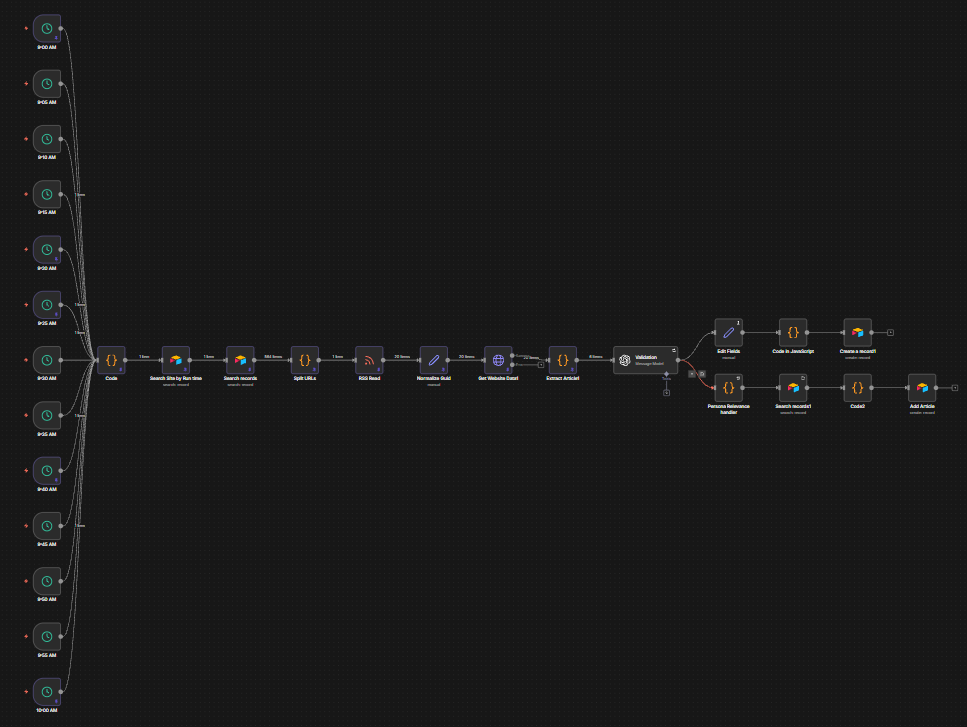
- RSS Feeds: runs on 9 staggered schedules between 9:00 AM and 9:55 AM, one per news source. Each trigger fetches the site’s RSS feed from Airtable, reads new articles, extracts content, runs an AI validation pass to score relevance and engagement potential, tags matched keywords and persona relevance, and creates an Article record in Airtable for any article that passes
- Scrape URL and Get Content: triggered from Airtable for articles that need manual scraping, fetches the article URL, extracts the full text, runs the same AI validation and persona relevance scoring, and updates the Article record
- Scrape Paywalled Website: handles articles behind a paywall by using an alternative HTTP approach to retrieve content, then runs the same validation and persona tagging pipeline before saving the article
- Create Post Content: the core content generation workflow, triggered when the operator clicks Create Content on an article. Fetches the article and persona data, generates a LinkedIn post, Facebook post, and Bluesky post and thread via OpenAI for each enabled persona, generates an image prompt, creates both an AI-enhanced original thumbnail and a prompt-generated thumbnail via fal.ai nano-banana, and saves all outputs as a Content Generated record in Airtable
- Regenerate Social Posts: triggered per platform from the Content Generated record, allows the operator to regenerate a single post (LinkedIn, Facebook, or Bluesky) with an optional custom prompt, without rerunning the full content pipeline
- Regenerate Thumbnail from Original: re-submits the article’s original thumbnail image to fal.ai nano-banana for a fresh AI-enhanced version, with an optional custom prompt, and updates the Content Generated record with the new image
- Regenerate Thumbnail from Prompt: generates a brand-new thumbnail from a text prompt via fal.ai nano-banana txt2img, with an option to overlay text on the image, and saves the result to the Content Generated record
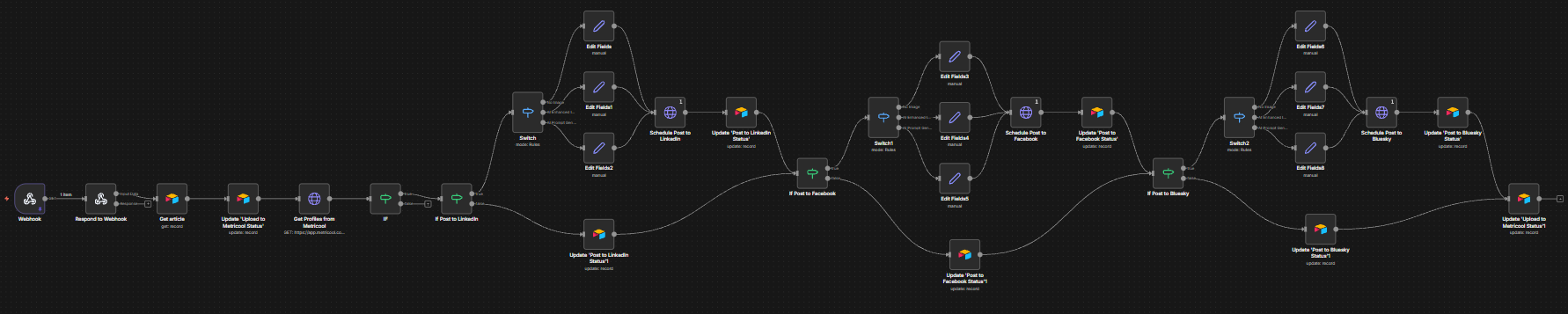
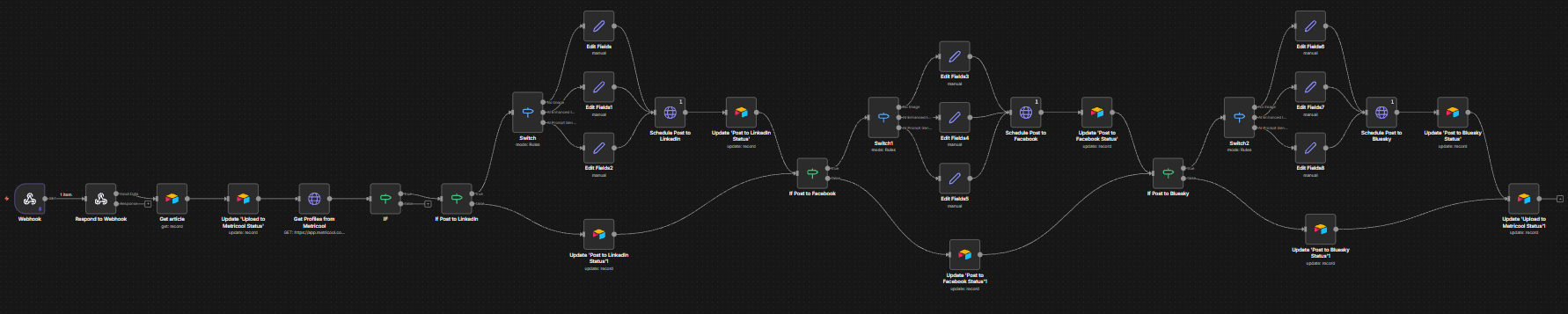
- Upload to Metricool: triggered from the Schedule Post button on a Content Generated record. Reads which platforms are enabled (LinkedIn, Facebook, Bluesky), formats each post with the selected thumbnail, fetches Metricool profiles, and schedules each post at the specified date and time
The Airtable Interface
The entire system is managed from a single Airtable base with two sections: Brand Settings and Main Workflow.
Brand Settings
Personas store the brand configuration for each audience. Each persona has a name, language, brand focus, brand tone, key messages, and full system prompts for LinkedIn, Facebook, and Bluesky. The AI Models table lists all available text generation models via OpenRouter, with token limits and temperature settings. AI Image Models lists the fal.ai image generation models available for thumbnail creation.
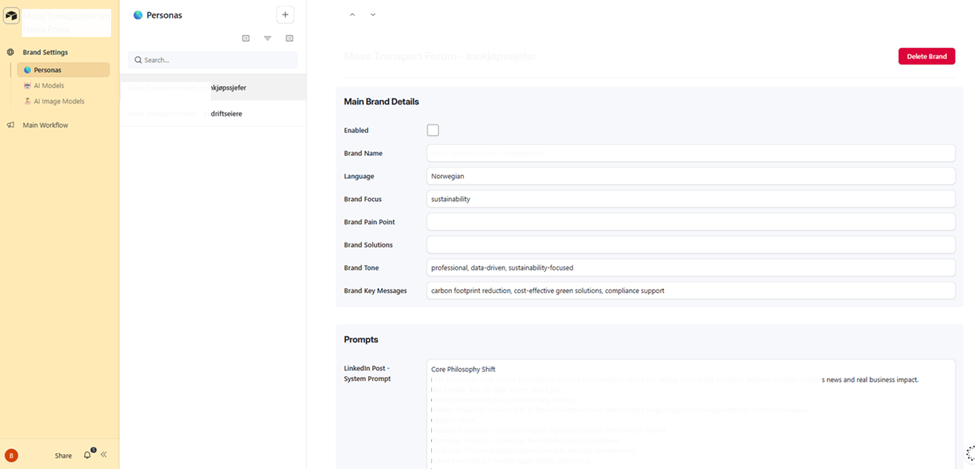
Personas — two named personas (Innkjopssjefer and Bedriftseiere) each with brand name, language, brand focus, tone, key messages, and full LinkedIn system prompt
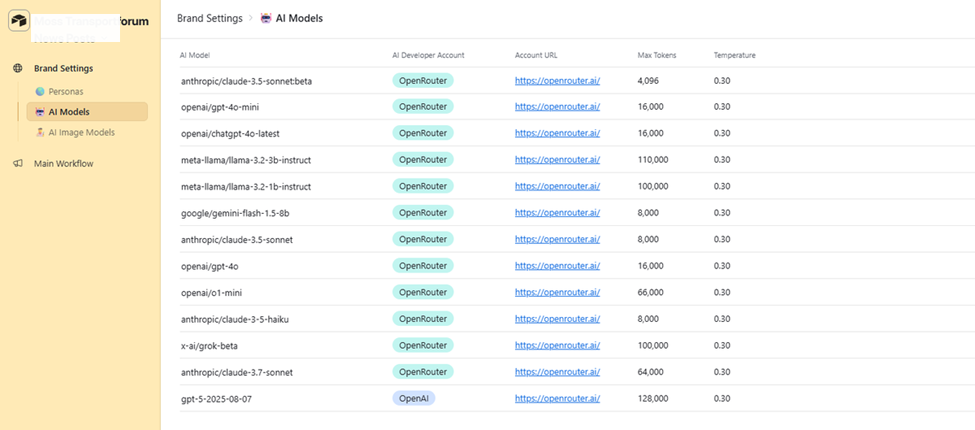
AI Models — 13 text generation models via OpenRouter including Claude 3.5 Sonnet, GPT-4o, GPT-5, Llama 3.2, Gemini Flash, Grok, and Claude 3.7 Sonnet, each with max tokens and temperature
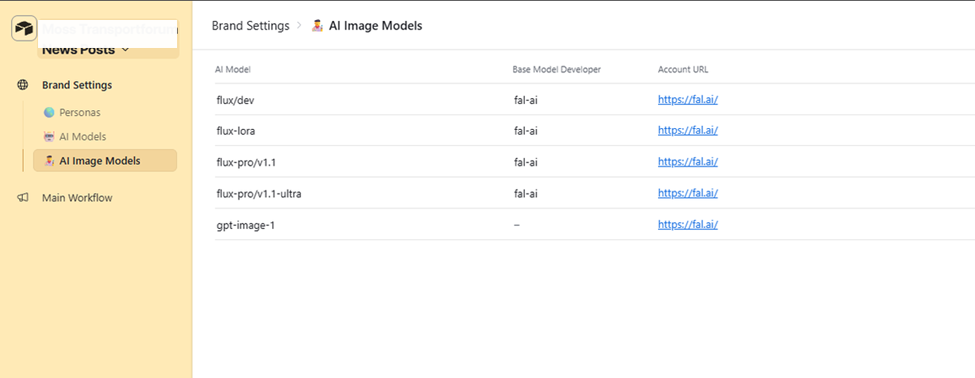
AI Image Models — 5 image generation models via fal.ai including flux/dev, flux-lora, flux-pro/v1.1, flux-pro/v1.1-ultra, and gpt-image-1
Main Workflow: Articles
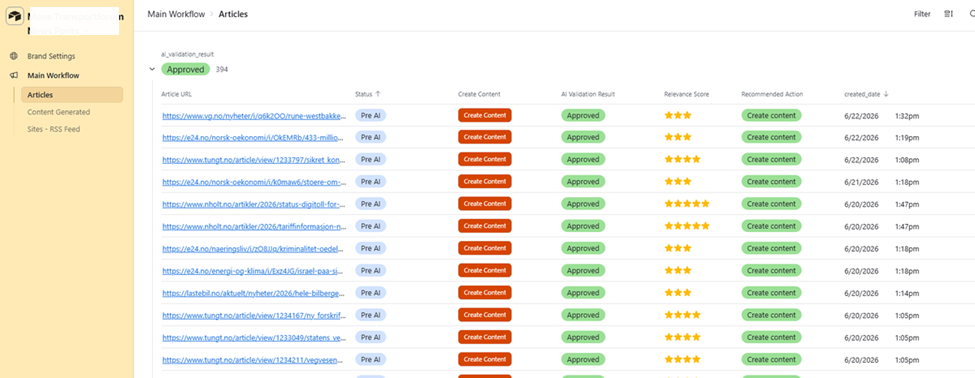
The Articles view is the operator’s daily starting point. All articles that have passed AI validation are listed with their URL, status, Create Content button, AI Validation Result, Relevance Score (1-5 stars), Recommended Action, and creation date. Opening an article shows the full scraped text, Business Relevance summary, Content Angle, matched keywords, persona relevance tags, and engagement potential rating. The Create Content button triggers the content generation pipeline directly from this view.
Articles list — 394 approved articles with URL, status (Pre AI), Create Content button, AI Validation Result (Approved), Relevance Score, Recommended Action, and creation date
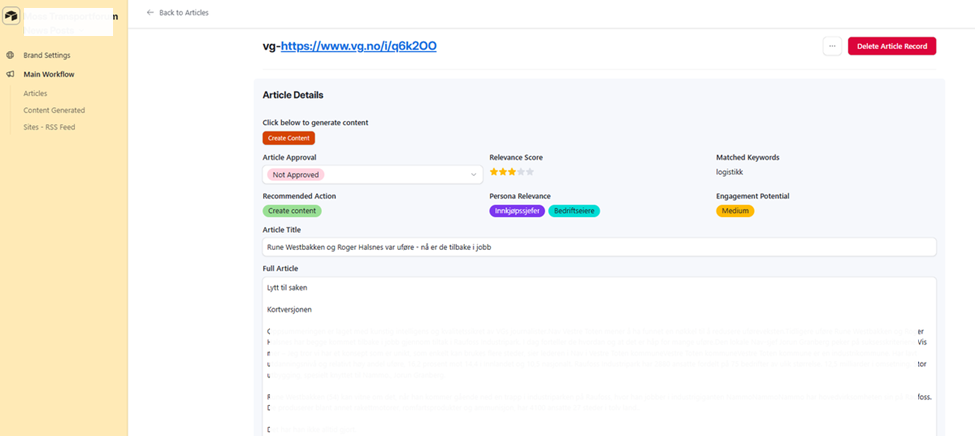
Article detail — Create Content button, Article Approval, Relevance Score (3 stars), Recommended Action (Create content), Persona Relevance tags (Innkjopssjefer, Bedriftseiere), Engagement Potential (Medium), article title, and full scraped article text
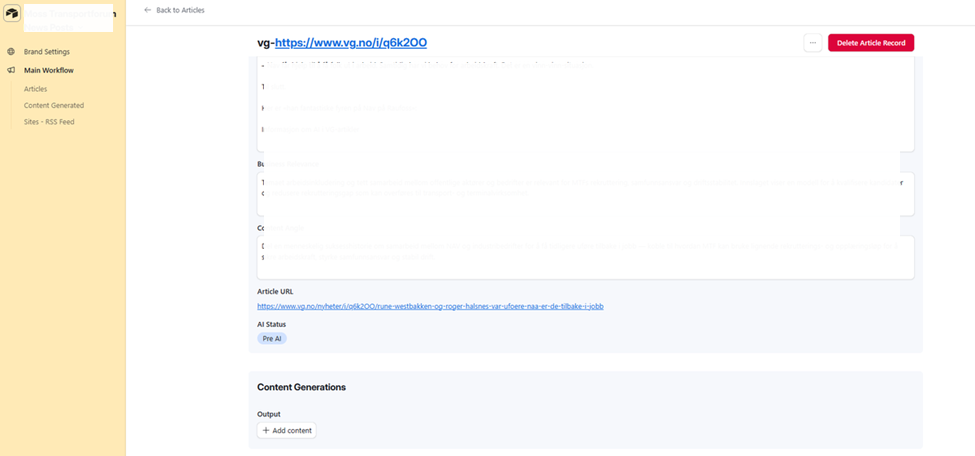
Article detail continued — Business Relevance analysis, Content Angle suggestion, Article URL, AI Status (Pre AI), and Content Generations output section
Main Workflow: Content Generated
Every piece of generated content is stored as a separate record linked to its source article. The Content Generated list shows the article URL, creation timestamp, and a preview of the LinkedIn, Facebook, and Bluesky post text for quick scanning. Opening a record shows the full content for each platform with individual Regenerate buttons and optional custom prompts, two thumbnail variants (AI-enhanced original and prompt-generated) with their own Regenerate controls, and a Post to Socials section where the operator sets the publish date, time, and platforms before clicking Schedule Post.
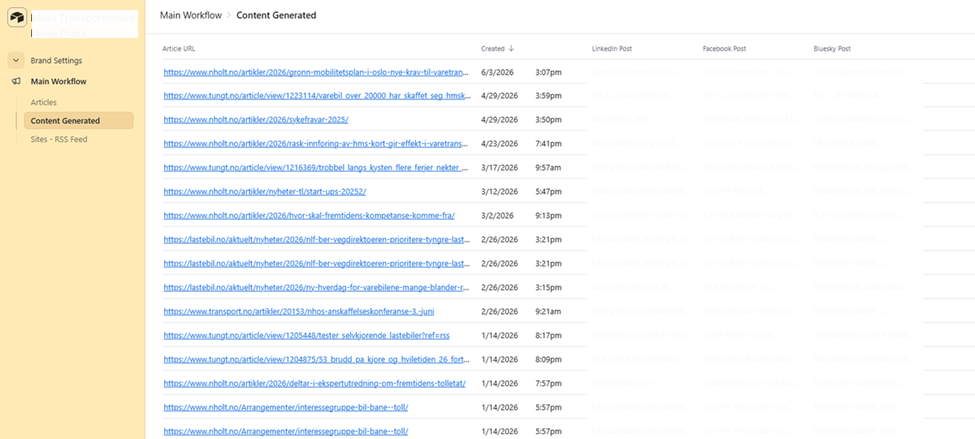
Content Generated list — all generated content records with article URL, creation date, and LinkedIn, Facebook, and Bluesky post previews
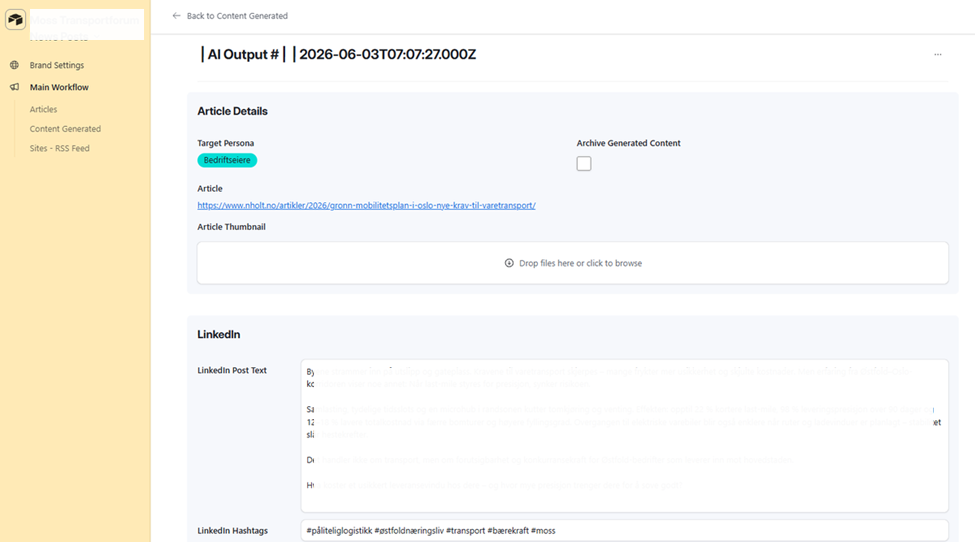
Content Generated record — Target Persona (Bedriftseiere), article link, Article Thumbnail upload, full LinkedIn Post Text in Norwegian, LinkedIn Hashtags, Regenerate LinkedIn Post button with custom prompt field, and Post to LinkedIn checkbox
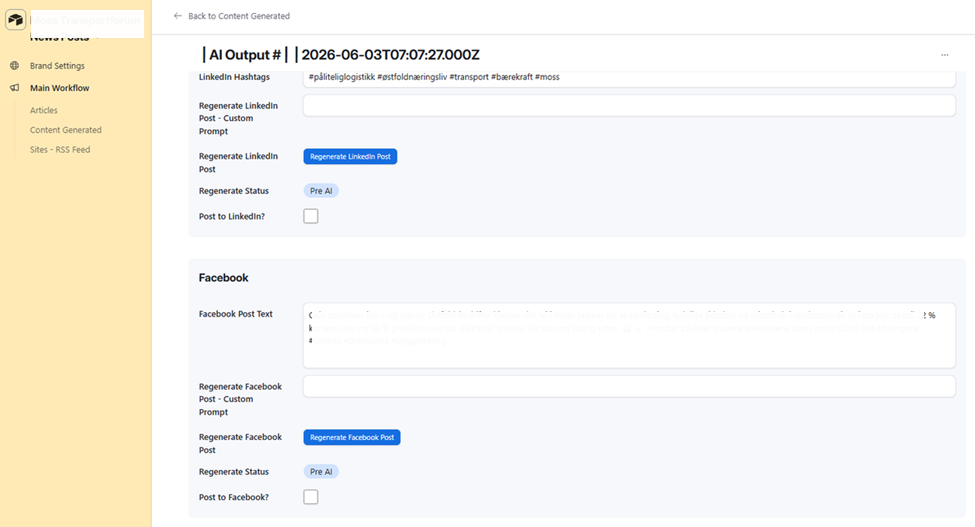
Content Generated record — Facebook Post Text in Norwegian with hashtags, Regenerate Facebook Post button with custom prompt field, and Post to Facebook checkbox
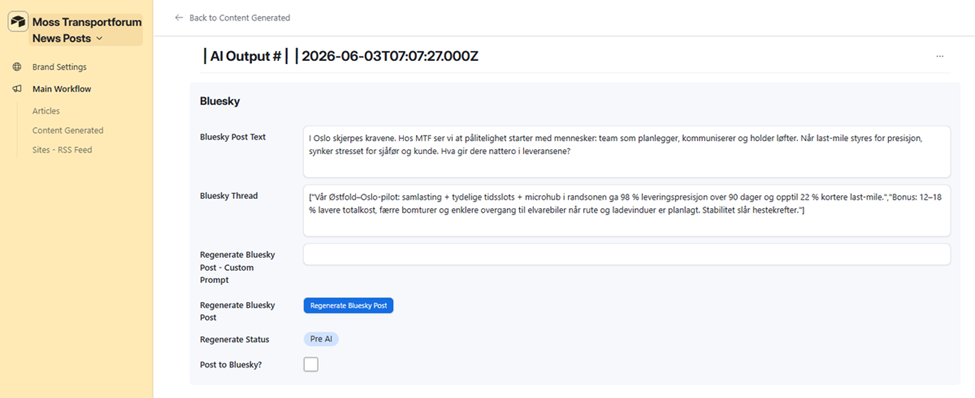 Content Generated record — Bluesky Post Text and Bluesky Thread array in Norwegian, Regenerate Bluesky Post button with custom prompt field, and Post to Bluesky checkbox
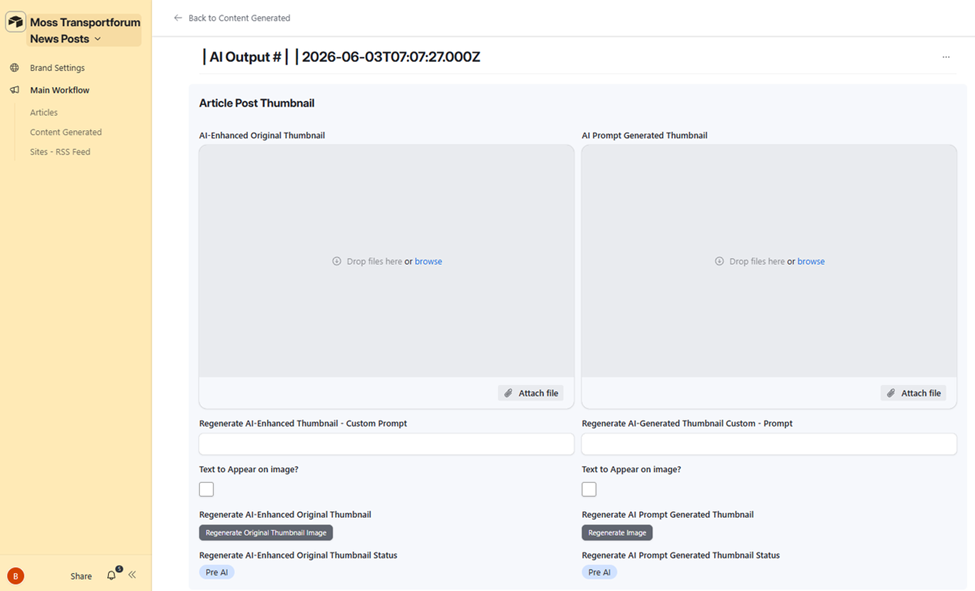
Content Generated record — Article Post Thumbnail section with AI-Enhanced Original Thumbnail and AI Prompt Generated Thumbnail attachment fields, custom prompt inputs for each, Text to Appear on Image toggles, and individual Regenerate buttons
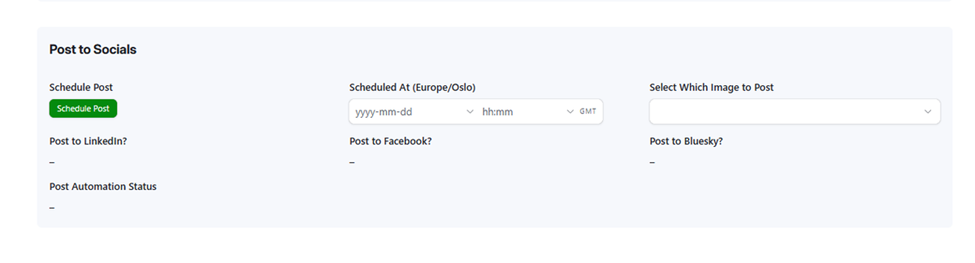
Post to Socials section — Schedule Post button, Scheduled At date/time picker (Europe/Oslo), Select Which Image to Post, Post to LinkedIn/Facebook/Bluesky checkboxes, and Post Automation Status
Main Workflow: Sites RSS Feed
The Sites RSS Feed table is the source configuration for the monitoring pipeline. Each record stores the source name, scheduled run time, base URL, and RSS feed URL. The workflow reads this table to know which site to check at which time each morning. New sources can be added by creating a record and assigning it a run time slot.
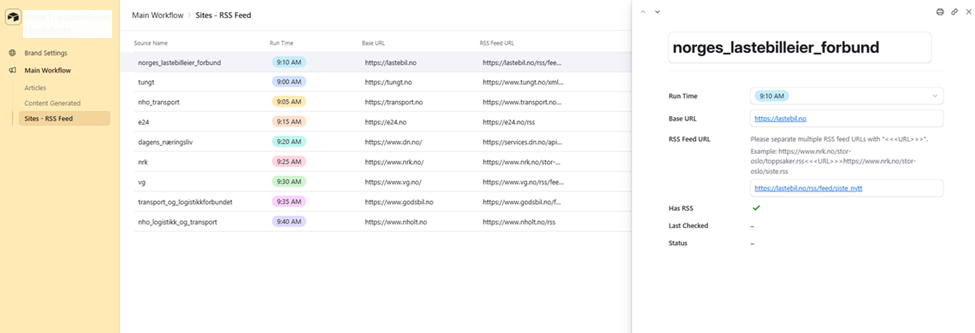
Sites RSS Feed — 9 sources monitored daily including Lastebil, Tungt, NHO Transport, E24, Dagens Naeringsliv, NRK, VG, Godsbil, and NHO Logistikk, each with a staggered run time between 9:00 AM and 9:40 AM and an RSS feed URL
Results

News monitoring that previously required manual scanning of 11 Norwegian trade and business publications now runs automatically every morning. Articles are fetched, validated for relevance, scored, and tagged to the right member persona before any human sees them. The operator opens Airtable, reviews the day’s approved articles, and clicks Create Content on the ones worth posting.
One click generates three platform-specific posts in Norwegian, two AI thumbnail variants, a business relevance summary, and a suggested content angle. All of it is tailored to the selected persona. The operator can approve as-is, regenerate any individual post with a custom prompt, or swap out a thumbnail without rerunning the full pipeline.
Every content record holds the full output for one article and one persona. The operator sets the publish date and time, ticks the platforms, and clicks Schedule Post. Metricool handles the rest.
The prompt and model configuration lives entirely in Airtable. Swapping to a different AI model, adjusting a persona’s tone, or updating a LinkedIn system prompt requires no changes to n8n. The system adapts to new instructions without a workflow edit.
How It Worked
Before: the team manually scanned Norwegian trade publications and business news sites, decided which articles were relevant, wrote post copy for each platform from scratch in Norwegian, sourced or created a thumbnail, and scheduled each post individually. Nothing was tracked. Content was inconsistent. Articles were missed on busy days.
After: the pipeline handles monitoring, validation, and content generation. The operator reviews and schedules.
- News monitored automatically. Nine sources run on staggered schedules each morning. New articles are fetched, scraped, and run through AI validation. Only articles that pass the relevance threshold and score above the minimum are added to the Articles table as Approved.
- Operator reviews the queue. The Articles list shows all approved articles for the day with relevance scores, persona tags, and engagement potential. The operator selects the articles worth posting.
- Content generated in one click. Clicking Create Content triggers the pipeline: OpenAI generates LinkedIn, Facebook, and Bluesky posts in Norwegian using the persona’s system prompt and brand guidelines. fal.ai generates two thumbnail variants. Everything is saved to a Content Generated record linked to the article.
- Posts reviewed and refined. The operator reviews each post in Airtable. Any post can be regenerated with a custom prompt without touching the others. Thumbnails can be regenerated from the original image or from a new text prompt.
- Scheduled to all platforms. The operator sets a date, time, and platform selection, then clicks Schedule Post. Metricool receives the post content and thumbnail and publishes it at the specified time to LinkedIn, Facebook, and/or Bluesky.
Want a System Like This?
If you run a membership organisation, industry association, or niche media brand and want to turn daily news monitoring into consistent social content without a full-time content team, this is the kind of system we build.
AI-powered news pipelines, persona-based content generation, multi-platform scheduling, and Airtable-based editorial workflows.