AI Carousel System
This is an example UI built to illustrate the idea, not the actual product. Design can be customized to whatever look and workflow fits the task at hand.
How We Built a System That Turns One Topic Into a Complete AI Carousel — Script, Images, and Scheduled Post
AI Carousel Production | Social Content Automation | n8n + Airtable + fal.ai + GoHighLevel
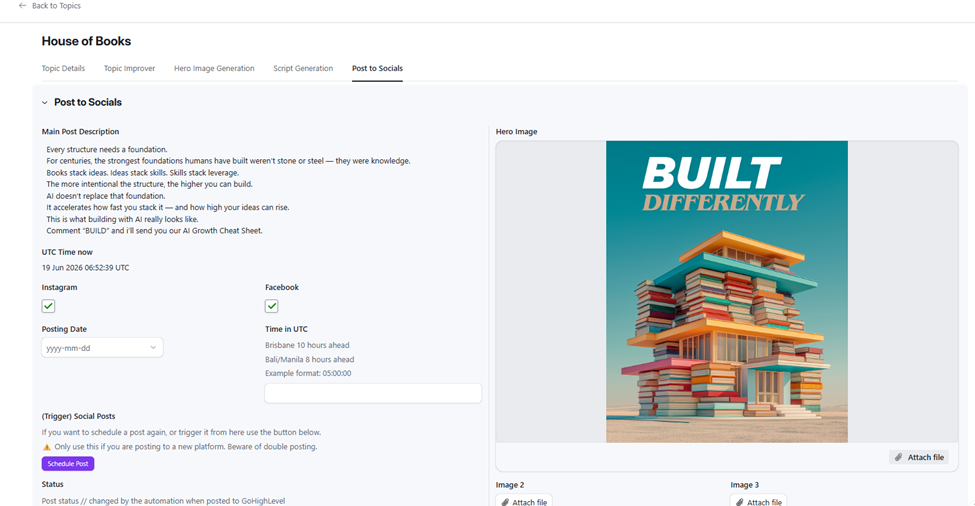
Post to Socials — approved hero image, generated caption with lead-gen CTA, platform selectors and scheduling fields
The Situation
Creating carousel content for social media is time-consuming in ways that add up fast. Each carousel needs a concept, a headline, a multi-slide script, a hero image, individual slide images, a post caption, and a scheduled post. Done manually, that’s a half-day of work per carousel — and the output is only as consistent as whoever is doing it that day.
The goal was to build an end-to-end system where a topic name is the only required input. Everything from the script to the final scheduled post should flow from that single starting point, with the human reviewing at key checkpoints rather than doing the production work.
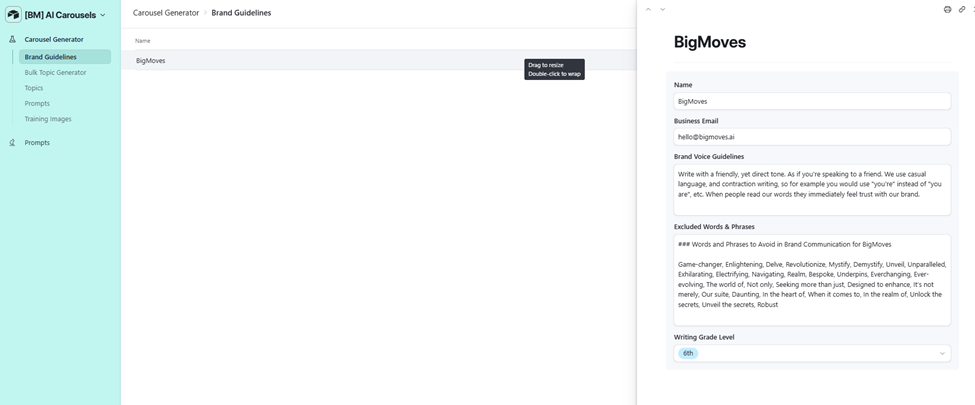
Brand Guidelines — voice rules, excluded words list, and writing grade level stored per brand in Airtable
The Problem
Carousel production had no repeatable system. Topics were conceived ad hoc. Scripts were written from scratch each time. Images were either sourced manually or generated with no consistency across slides. Post descriptions were written separately, with no structural connection to the script. Scheduling was a final manual step with no automation.
The visual consistency problem was particularly sharp. Carousel slides need to look like they belong together: matching color palette, consistent type treatment, alternating image and text patterns that match a defined style. Without a training image system feeding the image generator, each carousel risked looking like it came from a different brand.
At scale — 20 topics per batch — manual production was not viable. A system that handled one topic at a time manually could never keep pace with content demand.
The Solution
We built a 7-workflow n8n pipeline connected to an Airtable base that takes a topic concept and produces a complete carousel package: improved topic brief, hero image, per-slide scripts and image prompts, generated slide images in matched brand style, post description, and a scheduled post to GoHighLevel.
The Airtable base holds brand guidelines, training images (hero, secondary/image slides, text slides), prompt templates, AI model configuration, and full topic lifecycle from generation through publishing. The Airtable interface gives the operator a clean tabbed flow: Topic Details, Topic Improver, Hero Image Generation, Script Generation, Post to Socials.
The 7 n8n workflows:
- Bulk Topic Generator: takes a topic context and quantity (e.g. 20), generates topic names with descriptions and hero image prompts via Claude Opus 4.6, and creates individual topic records in Airtable
- Single Topic Improver: refines an individual topic’s description, headline, and hero image prompt for sharper clarity and visual specificity — without changing the underlying concept
- Generate Hero Image: takes the improved hero image prompt, builds the fal.ai request from the brand’s training image template, submits via image-to-image generation, polls for completion, and saves the result
- Create Carousel Script: analyzes the hero image for color palette, then generates the post description and full multi-slide script with per-slide image prompts in a single pass via Claude Opus 4.6

- Generate Slide Image: takes each script slide’s image prompt, builds the fal.ai request from the appropriate training image type, submits, polls, and saves the generated image to the slide record

- Regenerate Slide Image: replaces any individual slide image without rerunning the full pipeline — useful when one slide needs a redo after review
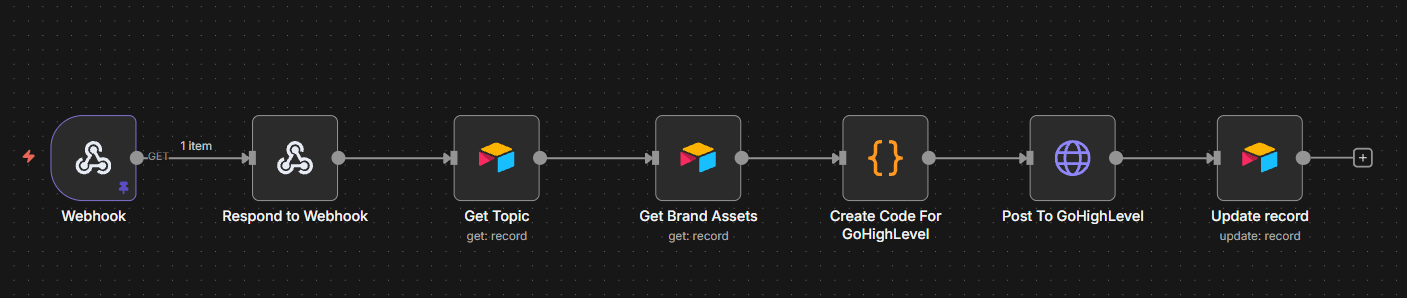
- Post To GoHighLevel: formats the approved post description and images, submits to the GoHighLevel API for the correct brand location, and updates the post status in Airtable
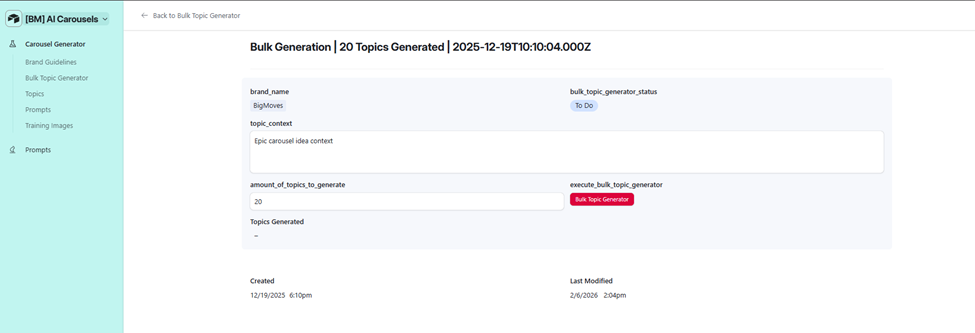 Bulk Topic Generator — topic context input, quantity selector (20), and one-click generation button
The training image system is what makes visual consistency possible. Three image types are stored per brand in Airtable: a Hero Slide Training Image (cinematic, headline-forward), a Secondary Slide Training Image (image-led slide), and a Text Slide Training Image (typography-led with minimal imagery). Each fal.ai image generation request is seeded from the appropriate training image, keeping the palette, layout, and aesthetic locked across every carousel.
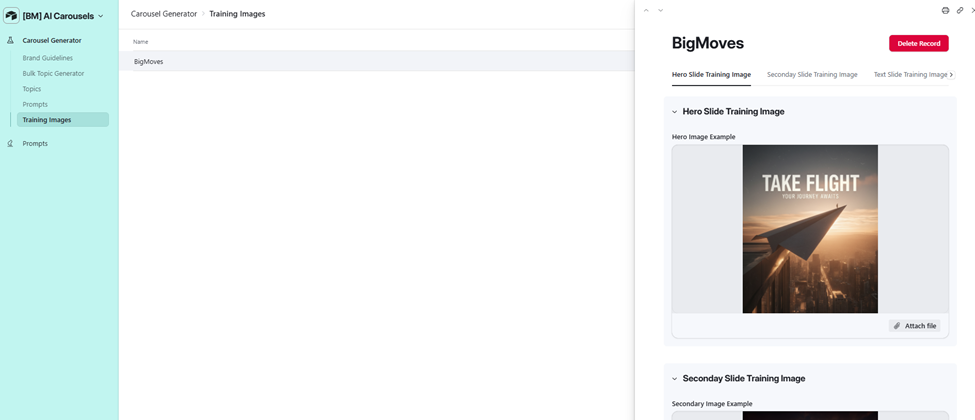
Training Images — Hero Slide Training Image (‘TAKE FLIGHT’) plus Secondary and Text slide templates stored per brand
The prompt system is editable but guarded. The Prompts section stores three templates per brand: Single Topic Improver Prompt, Post Description Prompt, and Scripts Image Prompt. A warning on each prompt notes that editing them can break the proven carousel strategy.
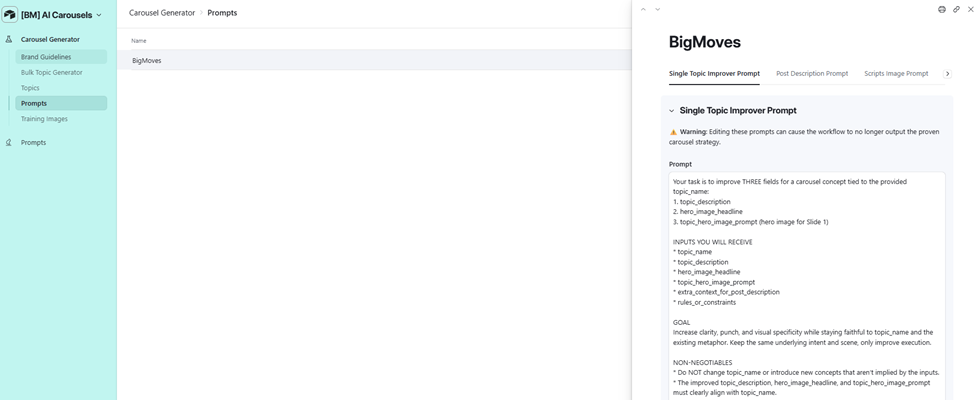
Prompts — Single Topic Improver Prompt showing task, inputs, goal, and non-negotiables for the topic refinement workflow
Color palette awareness is built into the script generation step. Before writing the script, the Create Carousel Script workflow sends the generated hero image to a vision model to extract the dominant color palette. That palette is passed into the slide image prompts, so every slide in the carousel is visually coherent with the hero.
Results

A topic name and context now produces a complete carousel package without a designer, copywriter, or scheduler involved in production. The operator’s job is approval: approve the improved topic brief, approve the hero image, approve the script, approve individual slides if any need a redo, then schedule.
The ‘House of Books’ carousel — built around an AI-generated home constructed from stacked books — demonstrates the full output: a cinematic hero image (‘BUILT DIFFERENTLY’), a post description with a lead-gen CTA (‘Comment BUILD and I’ll send you our AI Growth Cheat Sheet’), and a set of visually matched slides covering the narrative arc.
Topics produced include: House of Books, Elephant in the Room, Paper Plane to Rocket, Stepping-Stone Path, Galaxy Within, From Monochrome to Colour, Puppet Cut Free, Living Objects, and more — all reaching Complete status in the pipeline.
The AI usage tracker logs every Claude Opus 4.6 call with cost and workflow attribution. Create Carousel Script cost $0.094 per topic at 8,091 tokens. Hero and slide image generation cost $0.15 per image via fal.ai.
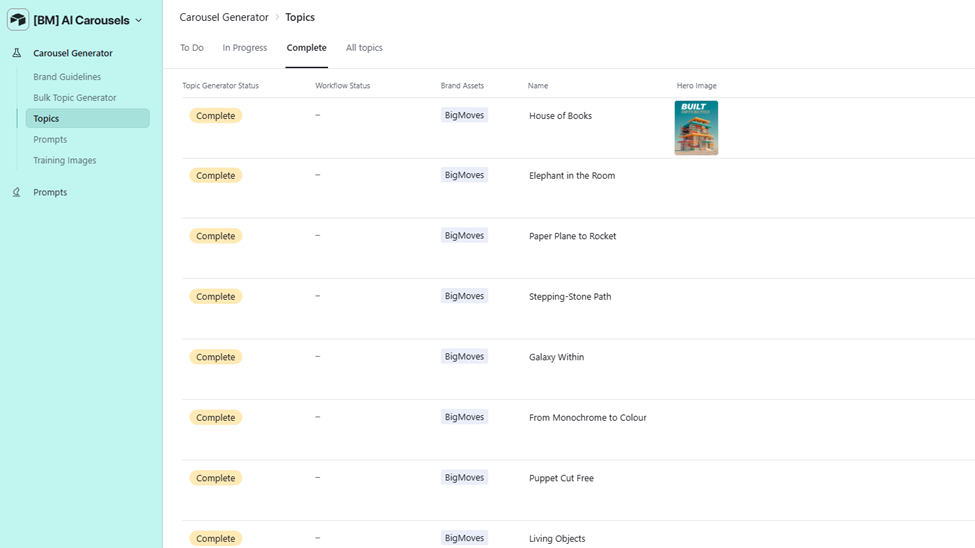
Topics list — 8+ completed carousels including House of Books (with hero image thumbnail), Elephant in the Room, Paper Plane to Rocket, and more
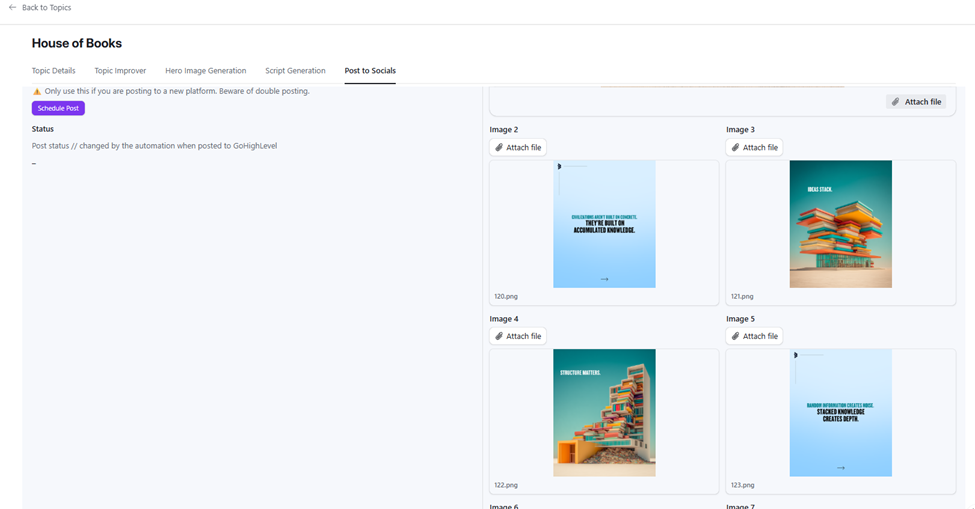 Post to Socials — full set of generated carousel slides for ‘House of Books’: alternating image and text slides with consistent brand palette
How It Worked
Before: concept a topic, write a script, source or generate images one by one, write a caption, post manually. One carousel could take hours. Consistency across a batch was difficult to maintain.
After: enter a topic context, click Bulk Topic Generator, review and approve topics, click through the production tabs in Airtable, schedule. The system handles every generation step between approvals.
- Topics in bulk. Operator enters a topic context and quantity in the Bulk Topic Generator. Claude Opus 4.6 returns the requested number of topic records with names, descriptions, and initial hero image prompts. Each becomes a row in the Topics table.
- Improve individual topics. For any topic needing sharpening, operator clicks Topic Improver. The Single Topic Improver workflow refines the description, headline, and image prompt without changing the core concept.
- Generate the hero image. Operator picks an AI image model, clicks Generate Hero Image. The workflow builds the fal.ai request seeded from the brand’s Hero Slide Training Image, submits, polls, and surfaces the result.
- Generate the carousel script. Operator sets font family and AI text model, clicks Create Carousel Script. The workflow analyzes the hero image for color, then generates the post description and full slide script with per-slide image prompts in one pass.
- Generate slide images. Each slide record has a Generate Slide Image button. The workflow picks the correct training image type (image vs text slide), builds the prompt, submits to fal.ai, and saves the result. Any slide needing a redo uses Regenerate Slide Image.
- Schedule to GoHighLevel. Operator sets posting date, time, and platform checkboxes (Instagram, Facebook), then clicks Schedule Post. The Post To GoHighLevel workflow formats the caption and image array, submits to GHL, and writes the post status back to Airtable.
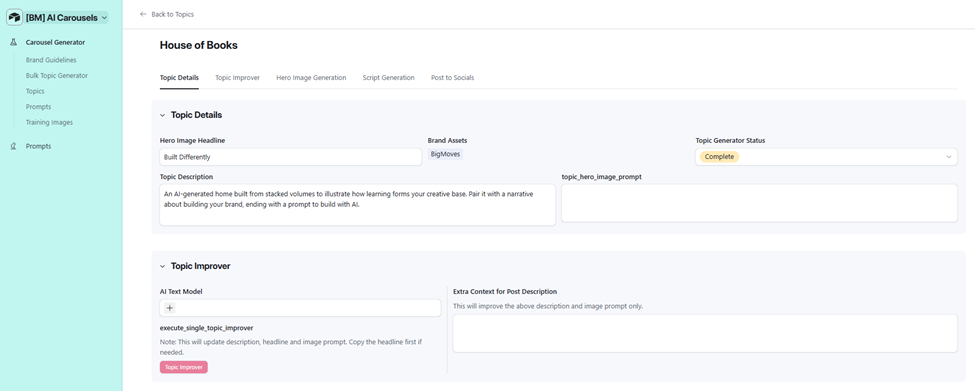 Topic Details — Hero Image Headline (‘Built Differently’), Topic Description, and Topic Improver section with one-click refinement
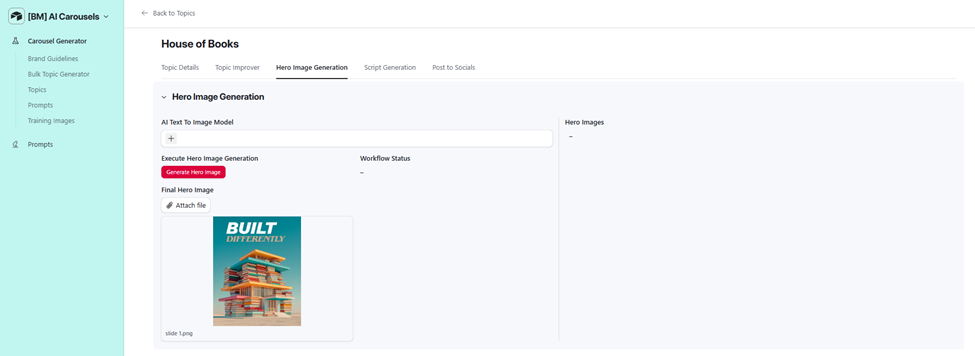 Hero Image Generation — Generate Hero Image button and the approved ‘BUILT DIFFERENTLY’ carousel cover
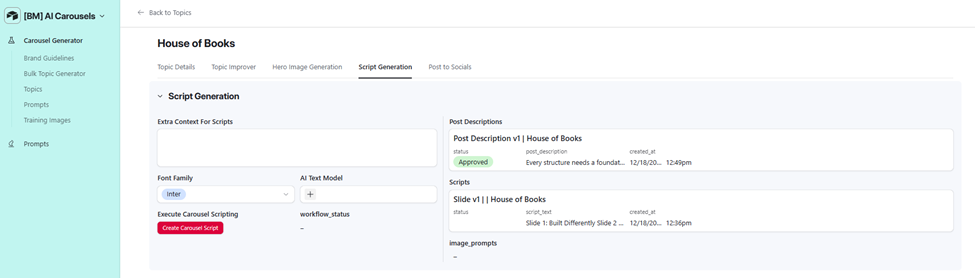
Script Generation — font family selector, AI Text Model, Create Carousel Script button, and generated Post Description and Script panels
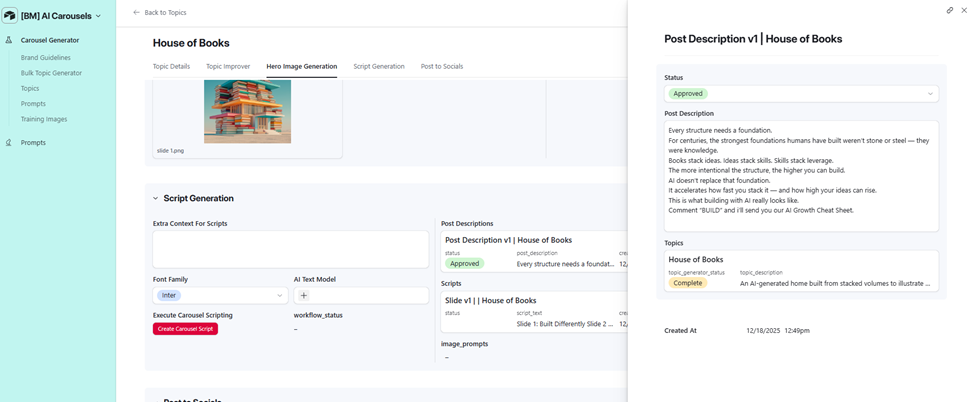 Script Generation with Post Description panel open — approved caption text linked back to the House of Books topic
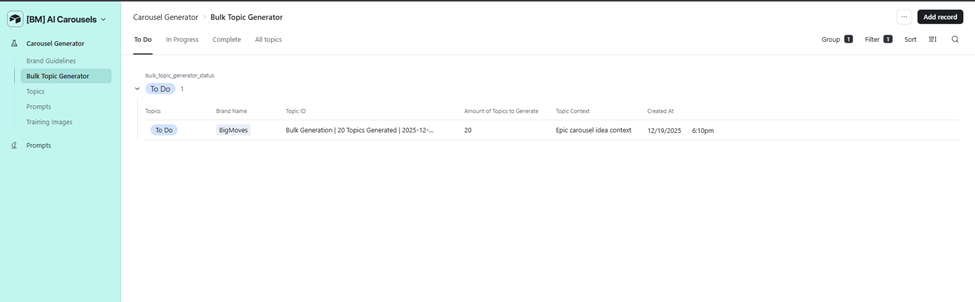 Bulk Topic Generator list — batch record showing 20 topics generated with status tracking
Want a System Like This?
If you’re producing carousel content at volume and spending production time instead of creative time, this is a solved problem.
We build AI content automation systems that handle production end to end — concept to scheduled post — while keeping your brand voice and visual style locked.